
iOS 14 has brought a lot of new things to iPhones. While some of the new features are quite striking, as they will significantly change the look of the system, others are of a smaller nature, which will nevertheless please. The second group also includes a new setting that allows you to take photos in 2018:16 on all iPhones released since 9 (inclusive) via the native Camera application. This feature was previously only available for last year's models. So how do you iPhone take photos in 16:9?
Gallery
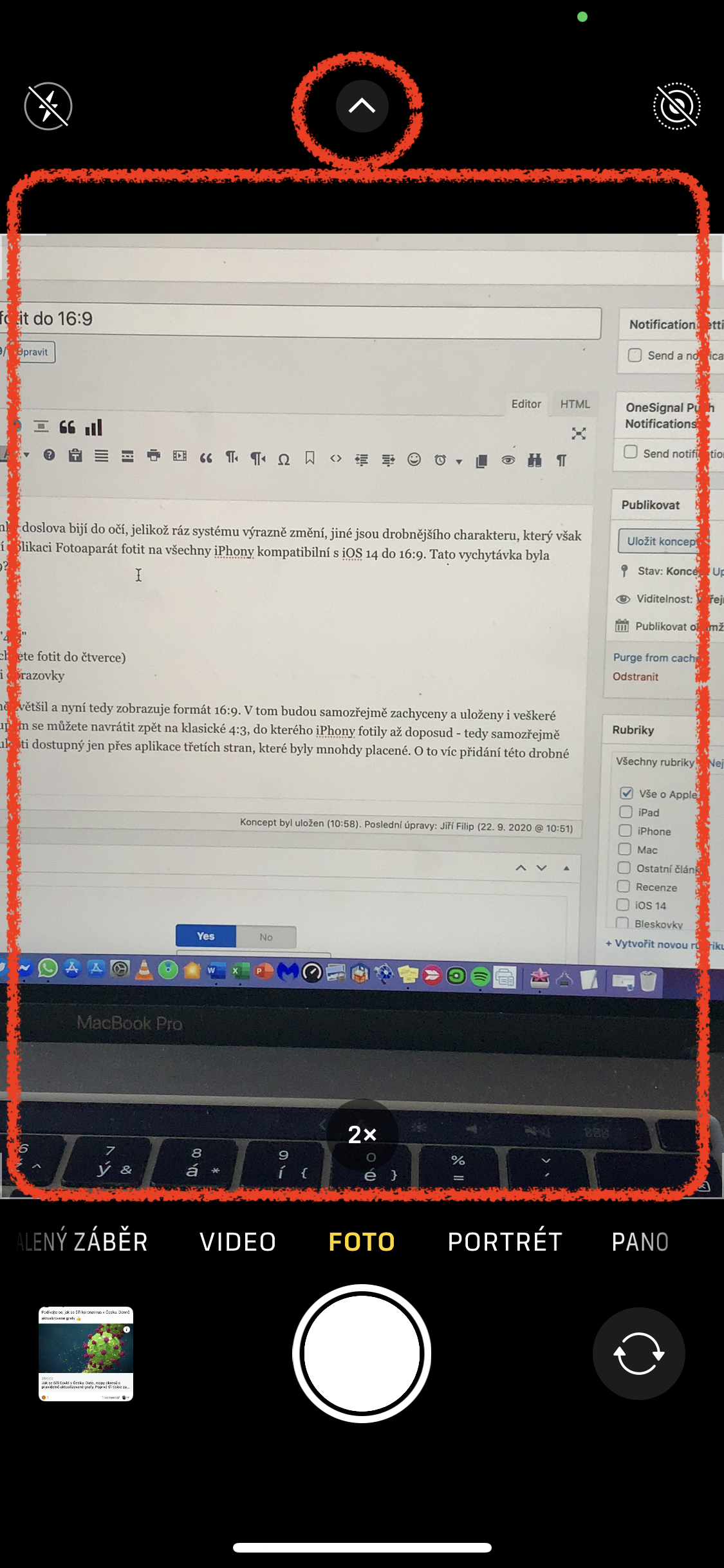
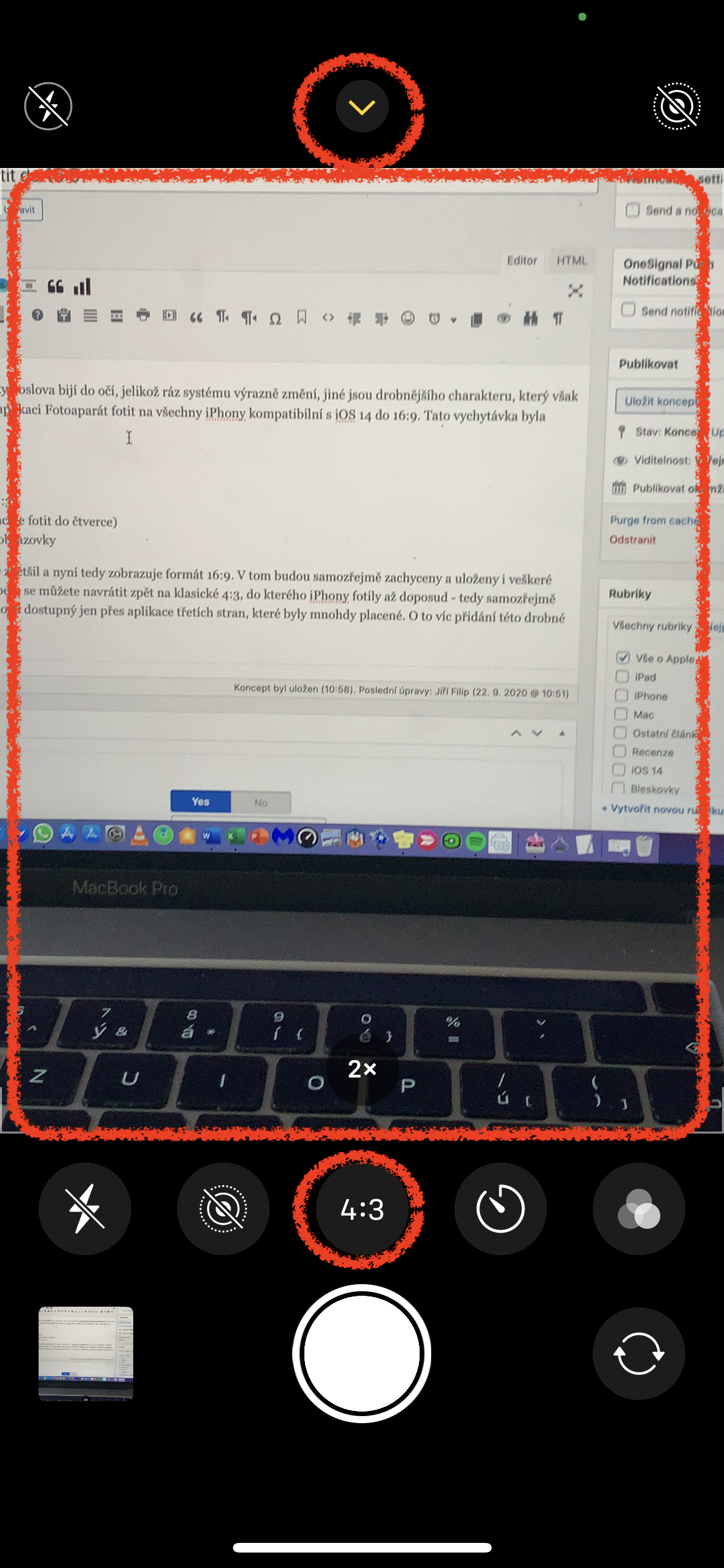
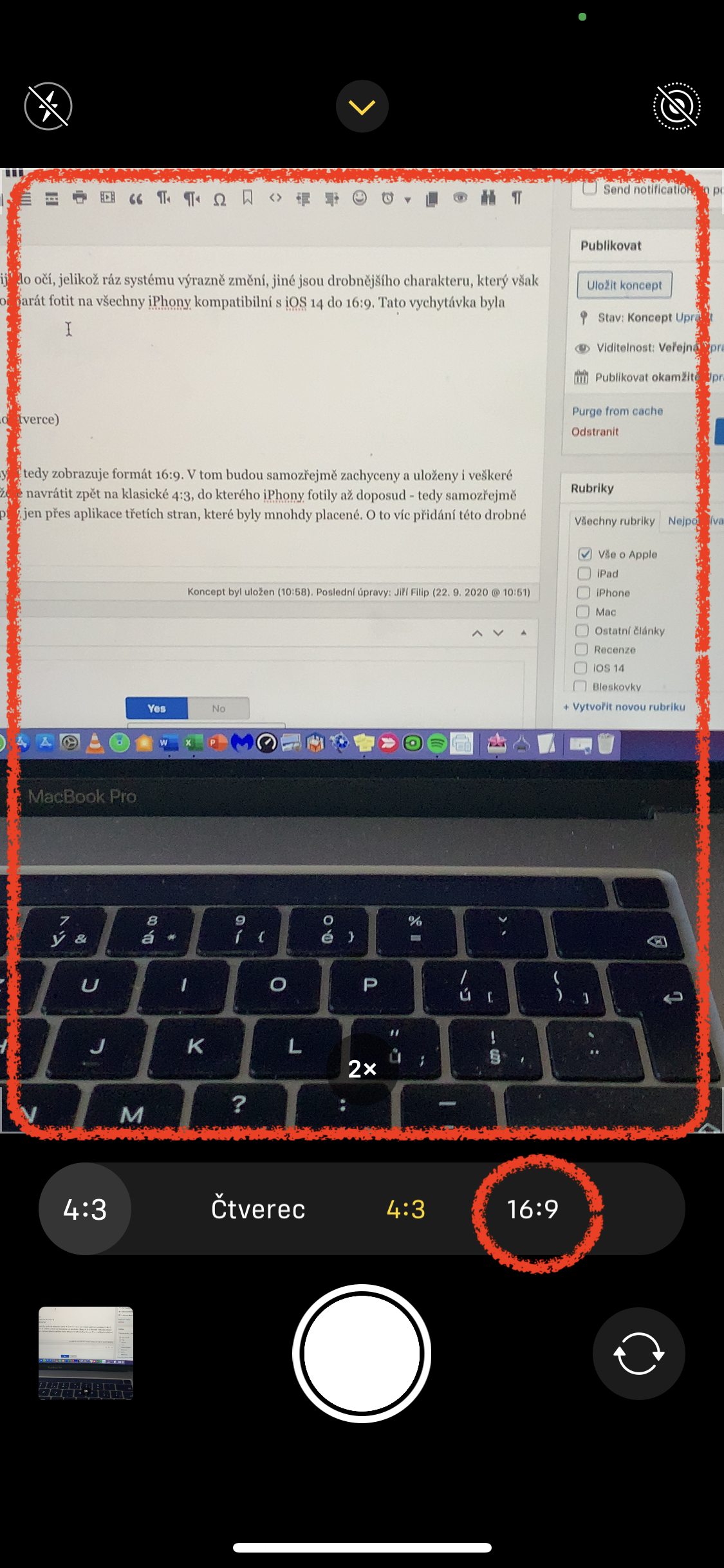
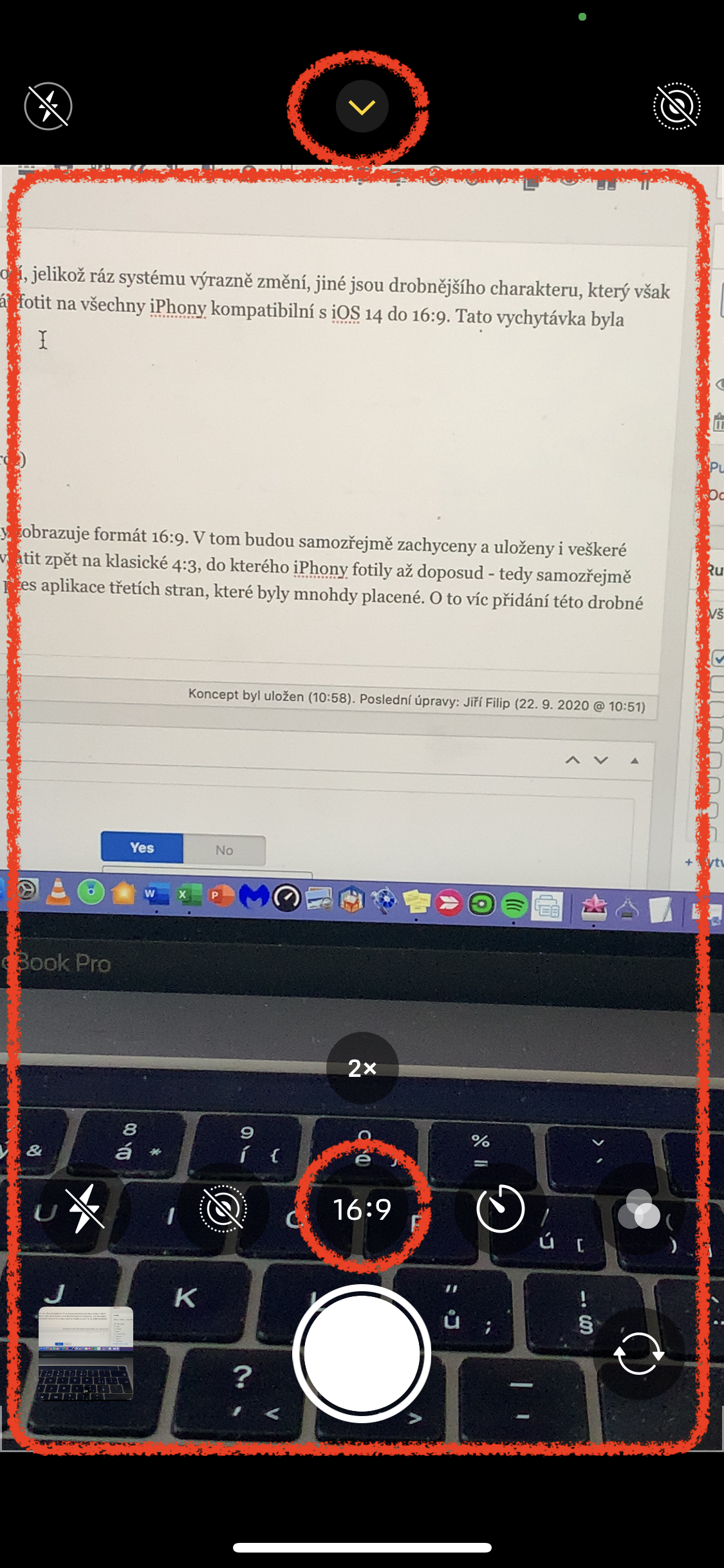
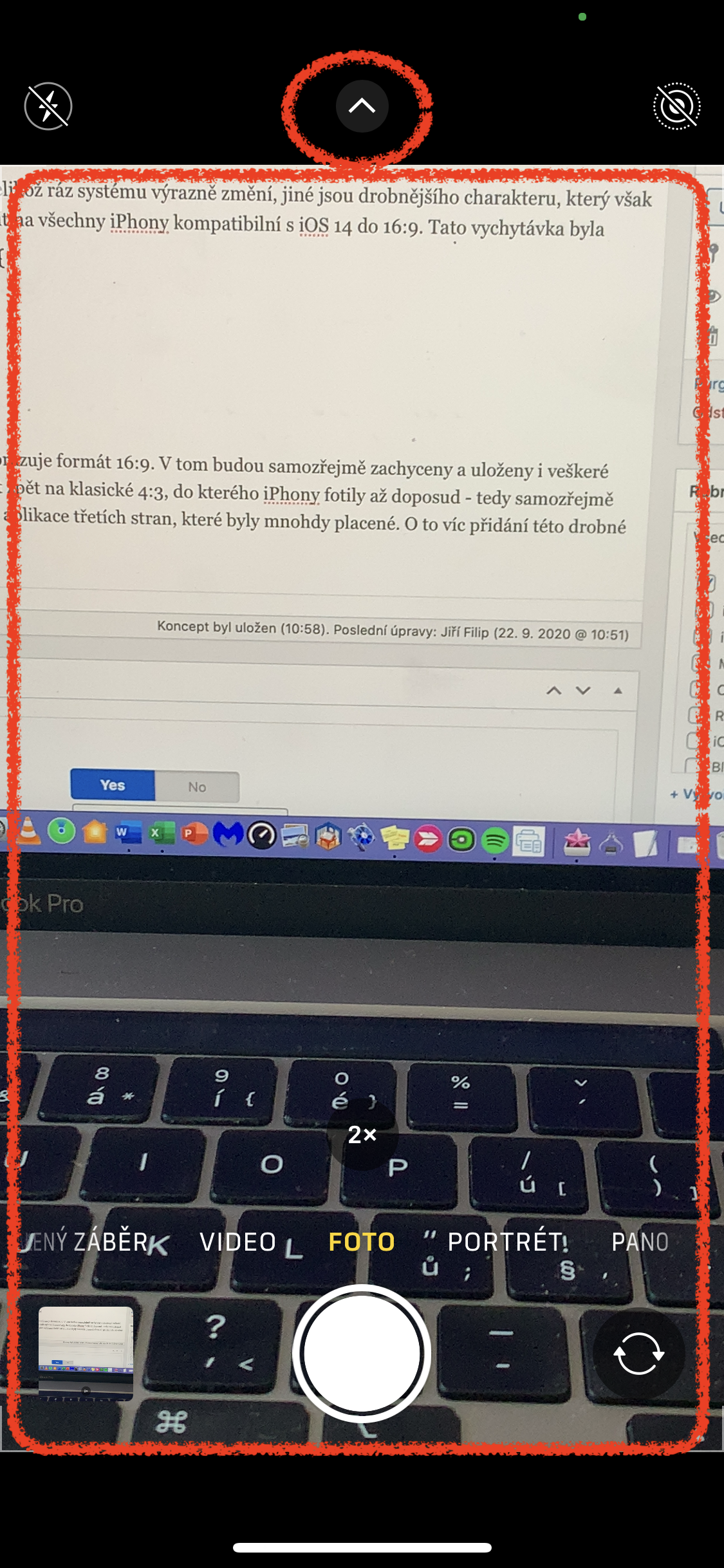
- Open the native Camera app
- Tap the upward arrow at the top of the screen
- After expanding the additional camera menu, tap the middle "4:3" button
- Set the format you want - i.e. 16:9 (i.e. square if you want to take pictures in a square)
- If you want to hide the additional menu, tap again on the arrow at the top of the screen
If you did it correctly, the viewfinder on your phone's display has already become significantly larger and now displays a 16:9 format. Of course, all photos in the Photos app will be captured and saved in this format. Once you stop enjoying this format, you can use the same procedure to return to the classic 4:3, which iPhones have been shooting in until now - that is, of course, via the native app. As for the 16:9 format, it was iPhonech was previously only available through third-party applications, which were often paid. The addition of this little trick will make you even more happy. And what about you, what format do you prefer to take photos in?







You write that it is for all phones with ios14, but I'll do it on my own
I don't have IPX. I can't see the rear tip up
IP8 also nothing
As written in the article, it is for iPhones released since 2018. Iphone xi iphone 8 were released in 2017
I have an XR and an old SE and it's only on the XR
I have it on my Xs.
This is really from AppThat's embarrassing. They should have added that piece of crap to everyone!
And has the aspect ratio of the sensor changed? Or do people not know how to crop a photo to the desired size?
Rather the second. The photo will be enlarged and cropped. So it's not real 16:9.
Do all iPhones have a 4:3 sensor?
That's never realistic. It always cuts by software.
Each photo sensor takes photos mainly at 4:3
It's funny how you keep apologizing for the somersaults you do Apple a person has to work to have a free function or format, etc. I thought he had an apartment Apple better simple to use and you throw an argument, you can't cut it?????
LOL, exactly!
If someone takes pictures like a photographer, cropping is always necessary. Then the 4:3 format, which offers full resolution, makes sense.
If someone takes photos like a normal clicker, then it's an awkward excuse and it makes sense to set a comfortable format for yourself. Then, but it doesn't make sense to put this setting directly in the camera, if no one will touch it during the entire time of using the phone anyway! It sets it up once and voila. A really useless feature that everyone was waiting for :D
I thought I'd never write this, but Jobs is turning in his grave miniat least once a week.
16:9 is an unnatural aspect ratio, like having a pixel with a rectangle cut out on your head 🤪
So you're probably a pixel real in your head. wide-angle format is more natural for image perception because you have two eyes and they generally perceive wide-angle. Of course, for a small picture, the 3:2 film format is better Apple always had it as standard and they quietly changed it to the stupid 4:3 which is the native aspect ratio of the sensor. Unfortunately since Jobs is no longer there, it is no longer in Applu doesn't think with his head.
Sure…. and that's why all photo chips are 4:3 and all the professionals in the world shoot and will shoot 4:3 that... Tvl, apple-picker = IQ of a tin gate.
Oh no
if someone prints photos but has them sent to them as usual on paper, let them not set 16:9, those who look at a monitor or watch TV should set 16:9
Yes, printed photos have a 3:2 aspect ratio
A bullet to the head for shooting in the 16:9 format.
ProC?
Everyone can set it up as it suits them (PC, aptv, etc.)
I have something 4:3 and viewing in aptv 16:9
My favorite is 3:2, which is the movie from which everything is derived.
I would rather be interested in how to set the Camera in this application so that HDR is always on (which makes me take much nicer photos during the day). When I turn flash or live photos on or off, these settings remain until I change them myself again. However, the HDR mode always switches to "Auto" mode after some time - that is, it does not glow yellow like when it is turned on manually. Of course, I have it turned off in Settings > Camera > Auto HDR. Does it work for you too? Just turn on HDR, then turn on any other app, and when you go back to the Camera app, HDR is no longer yellow, but only in auto mode. Thanks in advance for the tip if you have any.
It's in the camera settings.
I was just surprised that I already have this feature on my phone and I haven't seen it on anyone else. I have an SE 2020 ios 13.4.1. and I have this function there from the beginning. Anyone with the same experience?
KoneYes!
I used to berate why iPhones don't shoot in 3:2 format.
Today, when no amateur takes photos on paper anymore, 3:2 doesn't even make sense. For a pro, yes. Too bad they didn't add that too.
I was wondering which format is best if you only show them on a display or a TV. It works for me that 16:9, because TVs will have this format for a long time and so will laptops. Proare you FulHD too UltraHD has a 16:9 ratio, so it makes sense for vacation photos. Of course, everything is fine in landscape mode.
I probably already had it there. Iphone 6. I feel like it's been there forever and ever
a ridiculous function that even he could handle iphone They put 3G on phones since 2018... as a complete novelty for newer ones iphone lol, it's just a photo crop... of course apple A11 wouldn't be able to handle this is the need minilittle A12 … a classic at apple as well as unlocked SpO2 u apple watch 6 also has an SpO2 sensor Apple Watch s1 looool
pointless, it cuts the shortest side anyway, I can do that on my computer/tablet/mobile too....
I don't understand why they put it there at all...
So it's more convenient when you take photos on a trip and you know you'll be watching them on TV, Mac or phone.
Then you don't have to bother with any trimming. For amateurs (of whom there are 95%) it is perfectly ok in my opinion.
Again, a message worthy of this server.
This function is in iOS much longer. I don't know from which update exactly, but I can prove that on 13.6.1 it is on 100%.
Great that you're here. LsA woke up!
Oh, and does anyone know how to change the photo format on iPadOS? It looks like those idiots have completely removed this feature, or rather forgotten about it. ProIt's not even in the camera settings.