
Yesterday's released system iOS 9 per iPhone, iPad and iPod touch also brought new features that affected Spotlight and thus also the display of suggested contacts. In iOS 8 was a novelty in that favorite and recent contacts were displayed directly in the application switcher or in Multitasking, which suited some and not others. In iOS 9 is Apple suddenly decided to remove the feature added last year and start suggesting contacts in Spotlight, but only in one of two versions.
First of all, it's very pointless that contacts are only shown in Spotlight, which you can get to by swiping to the far left on the main screen. But you can call up another Spotlight as it was known before, that is, by swiping anywhere on the home screen from top to bottom, thereby moving the icons on the screen downwards, as it were. But you won't find any contacts in this Spotlight, but you can get there from anywhere on the home screen, so you don't have to swipe left all the time until you get to the side Spotlight, where the contacts are already there.
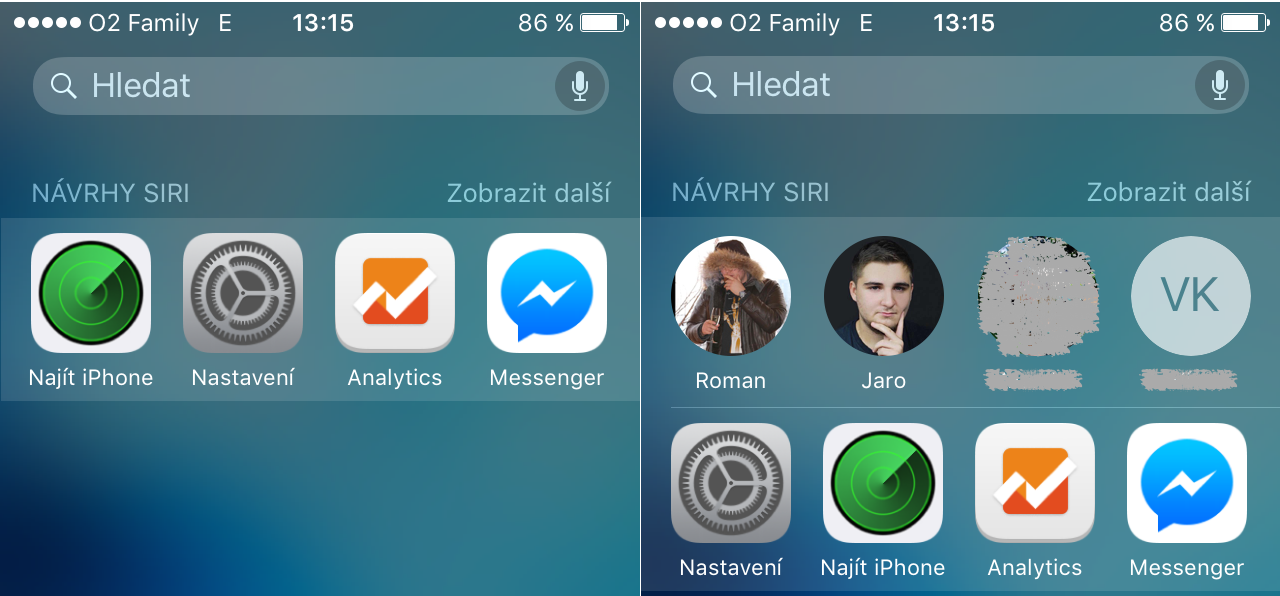
Last year when Apple added favorite and suggested contacts to the app switcher, so some users immediately looked for a way to turn this feature off. Of course, it was possible and quite simple. If some of you want to similarly disable the display of contacts in iOS9 in the side Spotlight, there is also an option to achieve this, but it brings with it the disadvantage that you will no longer be able to search for any contact via Spotlight, neither in the side nor in the original one at the top.
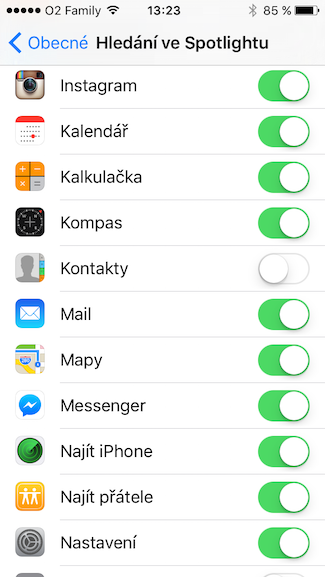
1. On your own iOS device go to Settings
2. Search In general
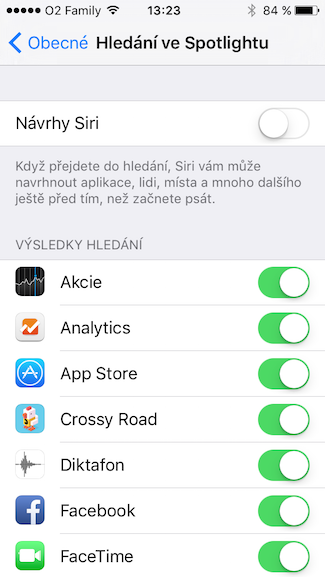
3. Right at the top here, click on Search in Spotlight
4. And in a fairly comprehensive list, turn off the item Contacts
If for some reason you don't want Spotlight to show you recently used apps, turn off the item at the very top in the same Spotlight Settings Proposals Siri.
|
|


Do you have a problem with searching for contacts in general in spotlight? As soon as I write even two letters, the only thing it suggests is the content of an SMS with the given contact or email. I can't get the contact to call at all. BTW: contacts are pulled from gmail.
Yes, I have a problem with that on my iPhone 5S too. I have some people Siri proit also searches for contacts, but there are probably a lot of them :) On the iPad Air 2 seems to behave correctly.
Turning contacts off/on in "Settings > Spotlight Search" doesn't help, nor does hard-resetting the phone. I have the beta iOS 9.1. I'll try to do it today.store na iOS 9.
Now a colleague was behind me (also iPhone 5S), that after upgrading from iOS8 na iOS9, he doesn't see people's names in Messages, only phone numbers. They are in contacts. Force quitting Messages and resetting don't help :)
And the “two Spotlights” are also strange – I would AppHe didn't expect it.
I also discovered that, on the one hand, characters with Czech diacritics moved to the first position on the keyboard (which is great), but when I want to write a small "ø", it is in the first position and a large "Ř" is in the second position...
I also can't search in contacts via spotlight - I have it turned on. (Iphone 6) and it really bothers me, because that's my most common way to contact people
Especially in the eight, it was difficult to set the order of the result. The idiot is doing it now siri alone. In two years she won't have iphone no more buttons. Siri she will call and write what she deems appropriate, to whom she deems appropriate.
I also can't search for contacts and it's really annoying. Has anyone figured out what to do with it? Thanks
You don't know why iPhone Can't bring up the side spotlight on the 4S? The one pulled out from the top doesn't contain contacts and the side one doesn't work.. After trying to get to the left from the home screen, it doesn't work. nestnope, no spotlight nothing..
So I tried everything possible and found: set (Settings-General-Language and region) Germany region, restart the phone and it should work. I then tried to change it to the Czech Republic again, reboot again and it still works. I don't get it, but it works :-) Let me know if it worked for someone else
Do you know how I can get the News to be displayed there? The region is USA, I have the News app, I have it turned on in the Spotlight settings, but nothing.
Restart?
Yanni: thanks a lot!!!!!!!!!!!!!! I'm already looking for it in contacts. Trick with the regionem works
It only helped me to salsa it off and on. Again not searching in contacts. In the Spotlight settings, I only have the contact search enabled, and at the same time, it only searches the E-mails that I have ticked off.
Looks like precision and reliability died with Jobs :-(
I'm screwed, it's not working again. I'm sorry I couldn't help…. I guess I'll try another region :-) If I find something that lasts more than a week, I'll post it here
Yanni, are you using gmail contacts? Maybe a dog could be buried in it. But then again, it's strange that resetting the region sometimes helps...
So it looks like this procedure worked, but only after a while, as if an index or something had to be created first. We'll see how long the contact search works ;-)
Approach:
– uncheck all SEARCH RESULTS in Settings/General/Search in Spotlight
– restart the phone
– turn on only contacts (or others in which it is desirable to search)
Great Derik. This worked for me. But one thing is interesting. I disabled everything, but after restarting about 10 things it disabled itself again...
So unfortunately, it doesn't search again and the update to 9.0.1 didn't help either?
Derik: I use contacts synced with MFE.
The update to 9.0.1 helped me for a week, so I was excited and lo and behold! it's not working again. Where did it go? iOS The hell is he walking?