
The ChronicDev Team behind the GreenPois0n Jailbreak released a version for the operating system today Windows. This version does not contain anything new, except for a few fixed bugs that plagued Mac OS X users. So if you have the ability to Jailbreak how to Windows, as well as on Mac OS X, we currently recommend choosing instead Windows. GreenPois0n RC5 can Jailbreak iPhone, iPod Touch and iPad running on iOS 4.2.1. This jailbreak is untethred and newly ChronicDev Team also added animated boot logoLet's take a look at him.
Approach
1. Download GreenPoison (Windows) and open it.

2. Click Prepare to Jailbreak (DFU)

3. Now you have to give iPhone into DFU mode according to the following steps.
- hold the sleep button for 2 seconds
- hold the sleep button for 10 seconds and home
- hold the button for 15 seconds home

4. If you were unable to get iPhone into DFU mode, so click the Reset button and try iPhone get into DFU mode again.

5. GreenPois0n is now fully ready to jailbreak your iPhone, just click on the box Jailbreak!
4. After a few minutes, GreenPois0n will jailbreak your iPhone, take a look at Home screen of your iPhone and find the icon named loader, open it.

5. Click on the Cydia box and click on Install Cydia. (It is quite possible that the Cydia box will not appear today because there are servers from which the Cydia Loader was downloading overload)
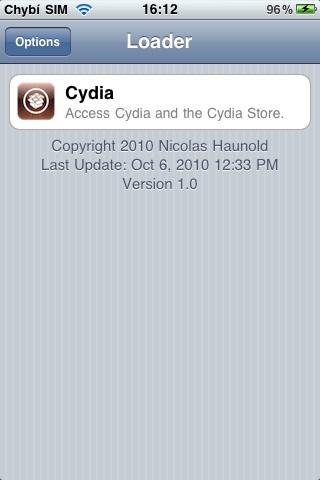
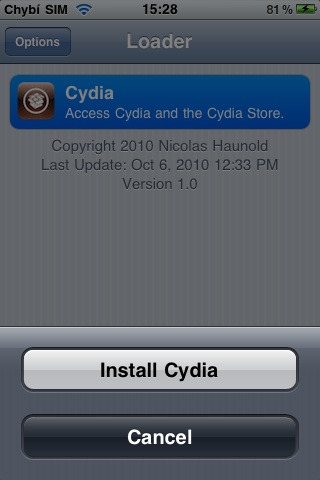
6. Now everything is done and you can enjoy your jailbroken iPhone. (If Cydia didn't show up, simply reboot iPhone and Cydie miraculously appears)

! WARNING! Server Letem svetem Applem even its editors are not responsible for any problems!


Hello, if I do a JB, will my existing apps be deleted or not? And instead App store Is there another application used on the iPad, or does the application have to be installed from a PC? Thank you.
Hi, I followed this guide on ip4 4.2.1 from t-mobile, everything went perfectly fine. Iphone It's jailbroken and it didn't even take 5 minutes. Thanks for the tutorial :-)
great, it works, thanks
hi, I have an ip4 (4.2.1), unfortunately I can't get into DFU mode), any ideas? Thanks
when I jailbreak with this on 3G, how can multitasking be enabled? with redsnow jb it was simple
hmm, so what? iphone It works on 3GS but it just didn't work on 3G so it doesn't work :)
Today I did Jb on iPhone 4 and so on iPhone 3GS. Right from the first time, everything runs smoothly :) just please, can someone advise me how to delete the Loader icon?
Hello, I would like to ask if I jailbreak my iPad if I can then unjailbreak it to normal 4.2 from applu, if there was a problem with the complaint, thanks :)
Does anyone have it on 3G? I have 3g 16gb, iOS 4.2.1(8C148) and I can't get it into DFU mode. REsp.according to iTunes it is in DFU, but according to GP it is not "TRY AGAIN".
Tom4-8: Everything will remain as it is :)
Tuchel: You are doing something wrong.
Tomas: There is no reason to jailbreak iPhone 3G via GreenPois0n.
Marek: Open Loader -> Options -> Remove Loader.app ;)
Petr: Sure :)
Petr Kolzak: Greenpois0n iPhone It does not support 3G. ProShouldn't it be, if you can jailbreak it via redsn0w?
everything is fine for me. the jailbreak package appeared. I have the version from vodafone and I don't want to start it
I want to ask if it is necessary to be connected to the network when downloading cydia from loaders?
can i ask how i can give a percentage representation of the battery status there ?? Is it possible at all?
And when, after installing cydia?
Díky
Noname: try downloading GreenPois0n from http://www.greenpois0n.com , ;) then it should work.
Ted399: Yes.
Simon: What's your equipment?
this doesn't work on iphone 3G? But the title says it works on all devices on 4.2.1
and can you pls advise me to use kery redsn0w for untethered JB na iphone 3G? I have a problem with entering DFU mode. I follow the instructions, but the iPhone screen flashes already in step 2: press POWER+ to agreeHOME button and I return it with the same double press. But all JB softwares tell me that it is not in DFU mode. But when I connect it to iTunes it tells me that it is in DFU mode and is ready to restore…I don't understand. Any ideas? Thanks
Today I switched it to the iPad exactly as described (rear G) and it's completely fine - I'll play it on the iPhone in the evening...
I would like to ask, have I successfully jailbroken my iPhone4 (it was very easy thanks to your instructions :)). Can I still use iTunes after jailbreaking??
I just did the JB and it worked fine thanks :)
Hello, my iPod turns off every time at step 2, do you know how to get around it???
Fix 3Step and 2 task: hold the sleep button for 10 seconds and home
Could someone recommend me where to download games after jailbreak?
Hello, problem.
I got into DFU mode and when I clicked on Jailbreak!, "Unable to find gBdevList etc.." popped up on my screen. I'll try again, but I've got it there. The Jailbroken state simply stops and does not continue.
ProI need advice.
Thanks :)
Hello, I have a problem with launching Cydia, everything was installed without any problems, but now I can't launch Cydia, I click on it and it crashes after 5 seconds. please advise what to do with it :) thank you
It works without a problem, in a few minutes the itouch was jailbroken
And it is not possible that GP supports newer versions Windows? Prothat's what I have Windows XP professional and it doesn't work for me either (it says Try Again, but Iphone it is already in DFU mode)
Finish it!
please advise, I turned on the program but I forgot the button and it froze my ipod
PLEASE WHAT TO DO WHEN I HOLD THE SLEEP BUTTON IT DOESN'T DO ANYTHING AND WHEN I TURN IT ON OR OFF ALSO NOTHING PLEASE ADVISE!
Then I let it charge through the PC, but I don't know if it registers anything at all, please advise.
Wow and what dfu try again
JOOOOOOOOOOOO SHINE SHINE IT SHINE! WOW!
However, the new logo is very, very annoying
All without a problem, if you forget to CLICK that button, don't worry! It happened to me and I almost had a heart attack (it froze) but then connect it and when I show you there put it in dfu state! the pc doesn't have to show you anything that something is connected there, so put it in dfu again and then jailbreak.
Many thanks to the author!
Great tutorial
I'm asking you to click on the jailbreak shelf, but I don't see anything like that and I don't see anything like that there either iphone it tells me that I should connect to itunes and I don't know what to do next... please advise.
please, it says to click on the jailbreak shelf, but it doesn't appear to me and I don't see anything like that there. iphone it tells me that I should connect to itunes and I don't know what to do next... please advise.
Prohelp me, I already downloaded poison, I have version 5.1 3gs iphone4 waterfone… should I download it? and one more thing… what is sleep? is it the one at the bottom where there is a frame or the one at the top where the phone turns off… and how do I do that? if I do that, the second step turns it off iphone :/
yes, I have it downloaded... but it's taking a really long time, I have version 5.1. I can't get it to work iphone?
I have an iPod 2G 8gb and 4.2.1 and it works, I download cydia, it didn't work much before
It's working now, thanks a lot to the admin and the author. Thank you