
Even though Siri is still not available in the Czech language, it is also used by countless users in the country. If you are one of those individuals who can speak at least a little English, you can Siri easily used to make calls, set a timer, or control smart home elements. Most often Siri we use it on iPhone or iPad, but in addition to these devices it is also available on Apple WatchOn Apple Watch you can Siri activate by saying Hey Siri, or by holding the digital crown. In addition to this, there is another activation option, namely by simply raising the wrist. Let's see together in this article how this feature can be activated and how you can use it.
You might be interested in

As Apple Watch activate Siri by simply raising your wrist
In case you want to on your Apple Watch activate Siri by simply raising your wrist, it's not that complicated. Just follow the following procedure:
- First it is necessary that you on your Apple Watch moved to home screen.
- Once you've done that, press digital crown on the side of the apple watch.
- After pressing the digital crown, you will find yourself in the list of applications, where you can find and tap on Settings.
- Then, within this application, go down a bit below and click the section Siri.
- Here it is just a matter of time.onec you just need to use the switch activated Raise the Wrist.
Gallery
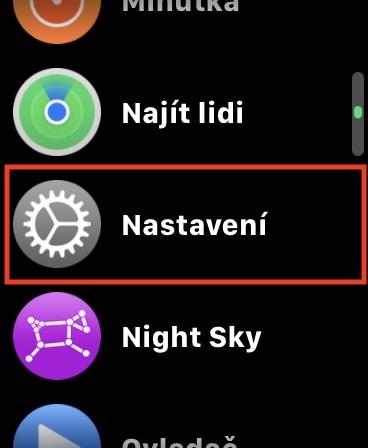
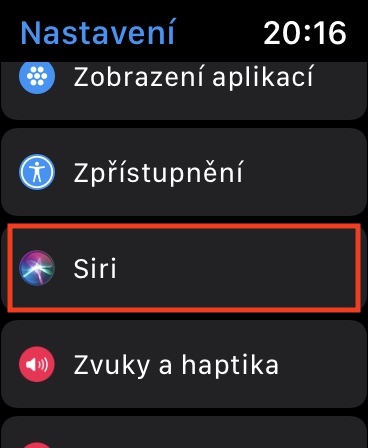

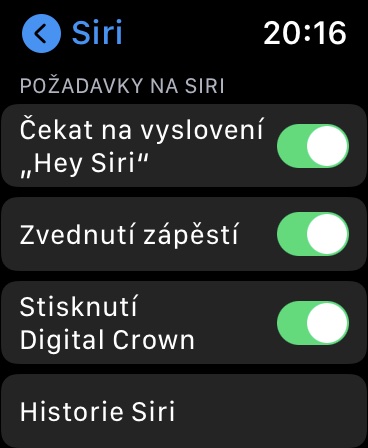
Now, whenever you want on yours Apple Watch quickly activate Siri, just lift the watch up towards your face and immediately say your request. No need to say Hey Siri, no need to press anything – just raise your wrist and speak, Siri will start listening to you immediatelychatIn addition, you can also Settings -> Siri set a bit lower, in which case it will be Siri provide voice feedback – options are available Always on, Control in silent mode a Just headphones. You will also find the option for settings here Reporting messages, you can change too language a voice Siri.




Hi, I can't help it, but it just doesn't work for me. In the settings, but Siri unresponsive
It doesn't work very well for me either, not even for addressing. Sometimes it works out, sometimes it doesn't.
Mainly, he starts talking out of nothing 😀
It worked for me at first, but that was a long time ago. I gave it sancbut then he resigned himself to it. ProYou can't do it.
It works for me 99% of the time