
Apple has long committed to focusing a significant portion of its efforts on services. As part of this effort, the company launched three of its subscription-based services last year. These include a gaming service Arcade, streaming TV+ and in some regionsonech also has News+. In addition, the Cupertino giant has been operating a music streaming service for several years. Music. Users who subscribe to any of these services receive automatic emails every month reminding them of their subscription renewal. However, these emails – especially if there are more than one – can be annoying in some cases. Apple therefore, he has now newly introduced the option to deactivate these regular messages.
Gallery
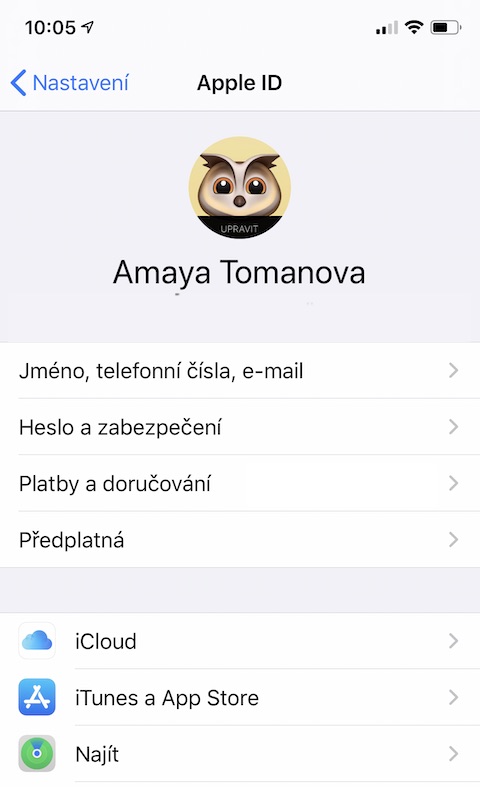
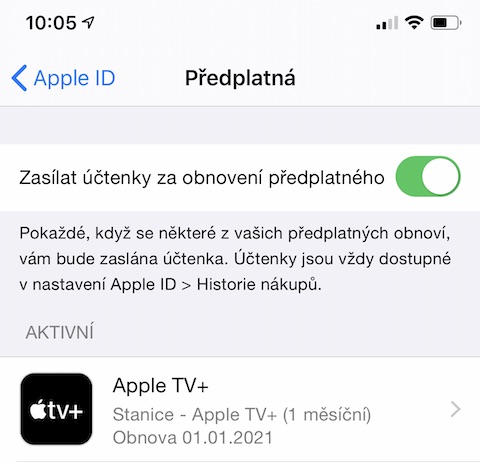
To the appropriate locations where users can manage their subscriptions, the company Apple recently placed a button for subscribers to opt-out of regular subscription renewal emails. If users deactivate the sending of e-mails on these pages, they will no longer receive confirmation of the renewal of the subscription and the corresponding payment. Regular e-mail notifications can of course be turned on again in the same way. If you want to disable regular subscription renewal emails, start on yours Apple device Settings. Click on panel with your Apple ID by account, where you select the item "Subscription". Above the list of applications for which you have an activated subscription, you will now find a new panel in which you can deactivate the item "Send receipts for subscription renewals". However, you will still have access to these receipts even if you deactivate their sending - you can find them in App Store -> Apple ID -> Purchase history.








Well, that seems pretty pissed off to me. If I don't receive a notification in the form of a receipt, I will easily stop having an overview of what was deducted from my account and people will not bother with subscriptions so much.
Well, I don't know. People have a choice if they want to send it. I don't care if I get ripped off every month either.cloud a apple music, when I know I have it activated. Some people may find these emails annoying and don't need them.
Plus, I don't know about you, but I can see what's going out of my account on my statement or in my mobile phone. appeh. :)
Great for me. I'm a self-righteous person, so I know what I'm paying for and what I'm not paying for.