
Each of us knows it and it has certainly happened to each of us at least once. You're browsing the internet and when you get bored, you want to close all the panels at once so you can start with a clean slate the next time you open them. So you start clicking on the crosses and then you realize that you accidentally closed a great article on Letem svetem Applem, which you still wanted to read. Since the article was a bit older, you would have had to search for it for a long time. ProBut don't bother searching when you can find it in your browser Safari Is there a simple function that can reopen the panels you last closed?
You might be interested in
How in Safari reopen the last closed panel?
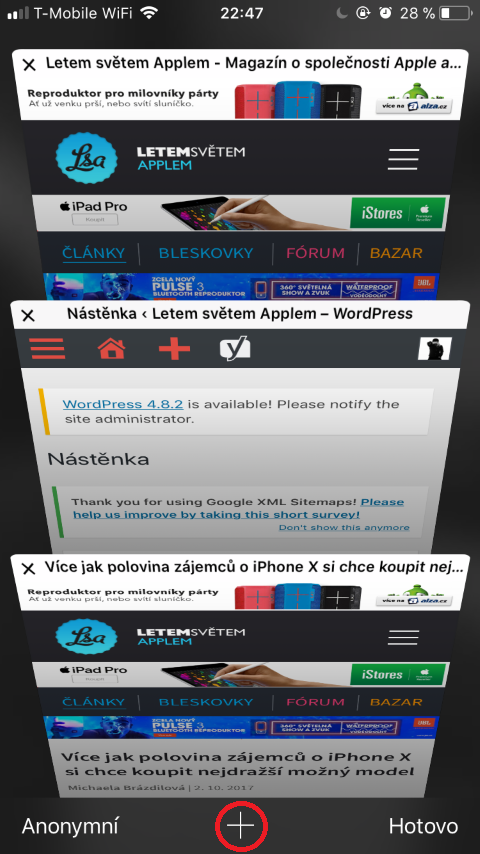
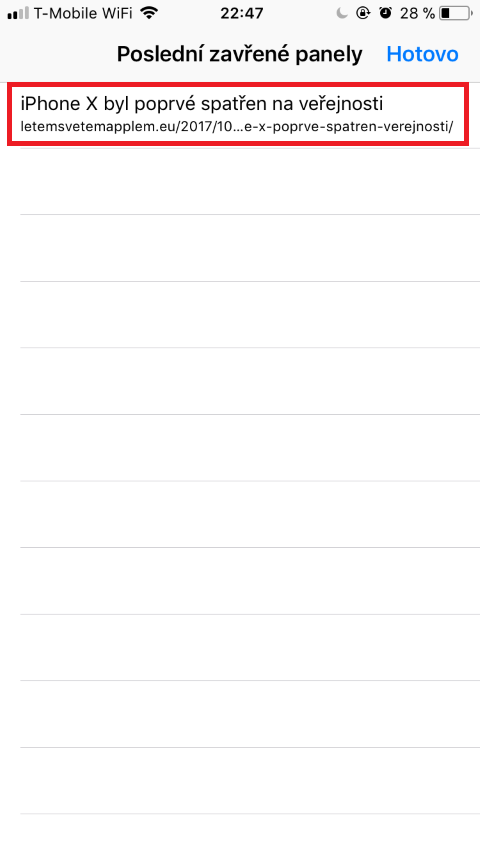
This feature is not hidden anywhere, you just haven't discovered it yet. When open Safari just click on two overlapping squares in right down corner. With this icon, you can open an overview of the panels, and you can also close the panels here, as I wrote above. If you want to open the last closed panels, just hold your finger on for a long time blue plus sign, located at the bottom of the screen, right in the middle. After a long hold, the list will appear Last closed panels. Here it is enough to simply click on the accidentally closed panel.
Gallery



It fits
This feature has saved me many times
Unbelievably, what does a normal BFU user need instructions for?