
We have already seen many videos about errors in the system iOS, which allow you to hide a folder inside another folder, or a trick to hide pre-installed apps that you don't want. The latest and probably strangest bug is the one in iOS 9.3. You can turn square folders with rounded corners into round ones by simply changing your wallpaper. Like other home screen “hacks”, this one is caused by a bug that Apple will fix in some of the next versions iOS, but until then we can enjoy the interesting shape of the folders. Before you get started, you need to make sure that your device is running on iOS in version 9.3. So let's see how to do it:
- You need to find a very small image for the wallpaper. You can download one of the presets on the website here. Just select one of them, hold your finger on it for a long time and select an option "Save Image"
- Go to the application "Pictures" and find the image you downloaded
- Tap the share button at the bottom left and choose an option "Use as wallpaper"
- Select an option "Set" a "On desktop"
Now when you return to the home screen, your folders will be completely round instead of rounded squares. However, how well this trick works also depends on what device you have. You may also need to play around with the placement of folders on your desktop. Somewhere the effect will manifest itself and somewhere not. However, be aware that Apple it can fix the error with each update and you will have round folders.
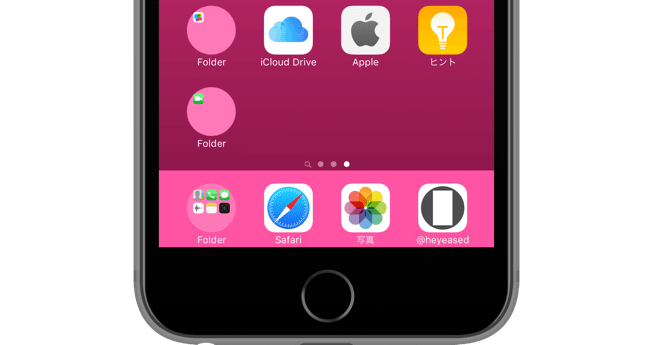
*Source: iphonehacks



V 9.3.2 beta 3 it doesn't work anymore.
Yuck.
…..with rounded corners
Just on these pages I read a review of the app "Damned Road" - I HIGHLY recommend it!