
Whether we're posting our photos on Instagram or simply want to enhance our photos, most of us add some kind of filter to our photos. The Photos app, which is part of OS X, offers eight pre-installed filters. Developers studio Macphun has released a great app today that adds 30 more filters for free. The Filters for Photos app is natively integrated into the Photos app, but can also be run as a standalone app.
In the basic settings, the application adds 15 additional filters, which are free. If you sign up for the email newsletter, the developers will unlock 15 more great filters for you. The mentioned filters can then be applied with one click. You are sure to think that there are hundreds of similar applications on the Mac, but this is one of the few that works directly with the Photos application from Appyou.
In the application itself, you can select only the part of the photo to which the filter will be applied, which is perceived as a very nice feature. How to set up the entire application and connect it to the Photos application?
First, let's download the app Filters for Photos free from the official website. Then we move the application to the folder "Application". If we can't find the folder, we open Finder and press the keys CMD + Shift + G and we insert this path "/Appapplications". Then just launch the application and, if you want, you can subscribe to the newsletter, which will add the other 15 filters mentioned. Then we open any photo in the application Fotky and in the upper right corner we click on Adjust. Then we click on the option Extension and choose the next option More. We select the application from the open list Filters for Photos. If we close the window with the list, we can click on the extension again and the Filters for Photos option will appear we click. After that, we can simply apply filters with one click.
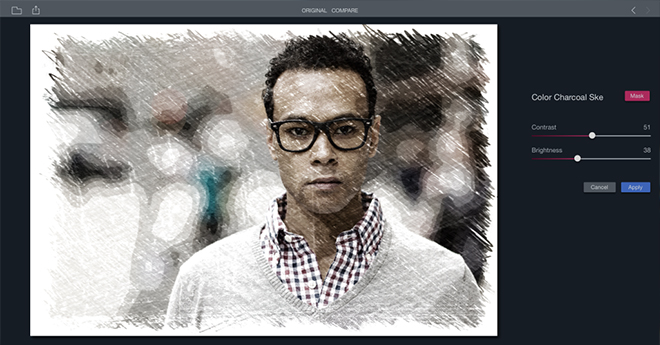
*Source: 9to5mac.com



Thanks for the tip, installed. The filters are great.
Beauty :) on iPhone Isn't that something? :)
I did everything as usual, but in the photos /Edit/ I don't have the extended menu at all.
Thanks for advice
HaSyS: What version of OS X do you have?