
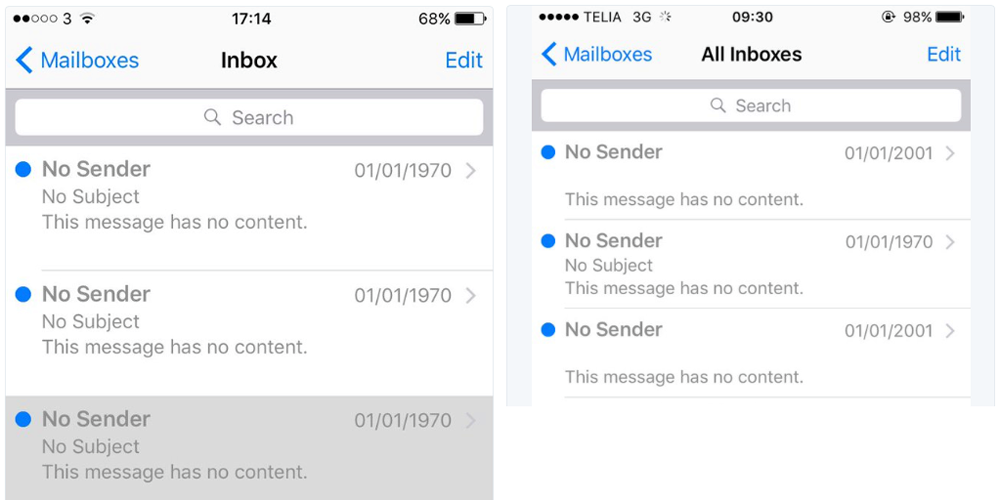
We recently informed you about an error that occurred when setting the date to 1.1.1970/XNUMX/XNUMX completely "freezes" iPhone. Apple fixed the error in iOS 9.3. The date 1.1.1970 is back on the scene, this time haunting some iPhone users. This time the bug concerns the Mail application and is completely harmless. Recently, it has been spreading on social networks screenshoty, which shows an email without a recipient, subject, text with the date 1.1.1970. The bug was reported on iPhone and iPad. In the past, Android users also reported the bug.
As with the previous error, the time zone and Unix time settings are behind all the problems. This is because users report that the error occurs when they travel to a different time zone, which can cause faulty communication between the server and the mail client. 1.1.1970/0/0 represents 1.1.1970 in UNIX time. If the email is sent from a different time zone, the mail client cannot distinguish the zone, so the date is set to XNUMX, which is exactly XNUMX/XNUMX/XNUMX.
If an email from 1970 also appeared in your inbox, in most cases you can solve the problem by closing the email application and opening it again. If the emails do not disappear, you can try a Hard Reset, it will definitely help. Apple the bug has been confirmed and should be fixed in an upcoming update iOS 9.3.
*Source: 9to5mac.com







I have been receiving such emails for years, it is spam with an old date, the date can be set at any time when sending the email.