
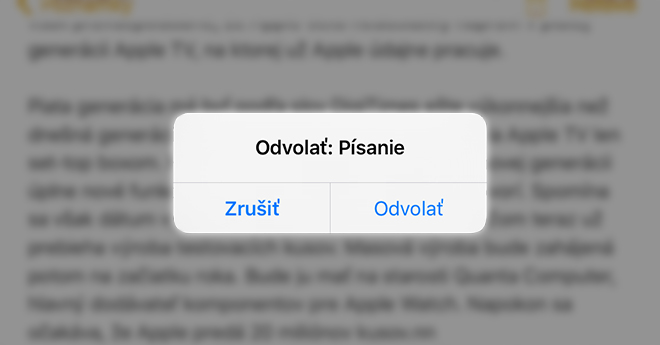
As a newcomer to the iPhone world, you have probably already encountered the fact that the option to delete the text you have written so far suddenly appeared on the display. This is the Shake to Undo feature that is in iPhone available for several years and its role was to make deleting erroneous text more pleasant. Today, however, many users find this function annoying, because the phone suggests it to you even when there is a slight shake, which can happen, for example, when you are standing in the subway. But the good news is that you can turn this feature off at any time.
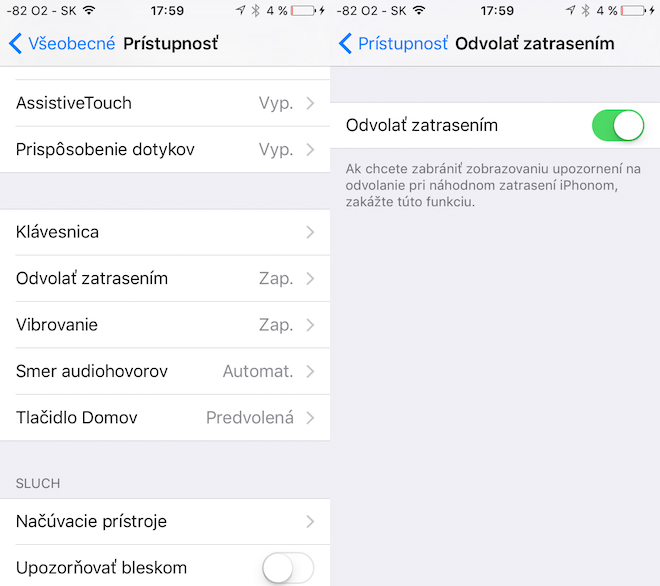
However, the option to get rid of this feature is hidden deep in your settings iOS devices. To get there you have to open settings, go to the section here General and then go to the section Accessibility. Now scroll to about half of the menu, where under keyboard you will find an option Cancel by shaking. Click on it and in the menu that appeared on your screen, turn off the green slider. Once you've done that, Shake to Undo is now disabled. On iPads, thanks to the new keyboard, the existence of this function can be completely stolen from you, since the keyboard has its own buttons for undoing or restoring changes in the text.


Great :-)
Oh, when I see those dubbed texts, I feel sorry for everyone who doesn't know English - and they have to use CZ and SK localization.
Quadrax: you are a different macher because you have settings in English.