
Spoločnosť Apple today quietly started selling the new iMac s Retina 4K display and simultaneously with its announcement, the information embargo fell. Thanks to this, the world-famous servers have already managed to publish the first reviews of the computer, and those interested in iMac have the opportunity to find out whether it is worth it for them to go for the 4K iMac, which is sold at an aggressive price of 1499 dollars. The price is really great, considering that this is one of the cheapest all-in-one solution on the market with a built-in 4K display and powerful hardware. The 21,5-inch iMac has a quad-core Intel Core i5 processor with a frequency of 3.1 GHz, an Intel Iris graphics chip Pro 6200, 8GB of RAM and finally a 1TB hard drive. But is a basic graphics card enough for the smooth running of a system that is connected to a 4K display? And what exactly is the new 4K P3 display, which Apple used in your iMac?
Foreign servers such as Ars Technica, CNET, Wall Street Journal and others have already looked at this. They agreed that the display was of exceptional quality and represented a big step forward from previous 1080p displays. But nothing is perfect and they criticized him, for example, for his absence USB-C portu (which you can find so far only on 12″ MacBooku) and the fact that the computer has a spinning disk with 5400 RPM.
Ars Technica: "Apple made some frustrating decisions: No Thunderbolt 3 or USB-C, even though these technologies are already the future. You will also find Fusion Drive only in the highest configuration of the 27-inch iMac. The Fusion drive itself Drive it will set you back $100, so it's cheaper than ever before. But we think so Apple he could easily put the 24GB SSD in the basic configuration, but it's 2015 and putting a 1500 rpm disk in a $5400 computer is strange. But if you don't mind these compromises, the 4K iMac brings you a great professional display and a powerful quad-core processor at a reasonable price. The 27-inch iMac is a computer that virtually erases the dividing line between consumer and high-end computers. If you don't want to play games, a smaller 21.5-inch iMac is more than enough for you. But if he could Apple with a future Skylake update make it from Fusion Drive and 4K resolution standard, we will no longer have any arguments."
CNET: "Keen Retina the display is one of those things you don't want to give up just like that, even if you're not watching 4K content. In addition, it is very competitive in terms of price compared to computers with Windows. If you already have an iMac, a new model isn't something you absolutely need to buy, but it's definitely worth getting a new keyboard, mouse or trackpad. "
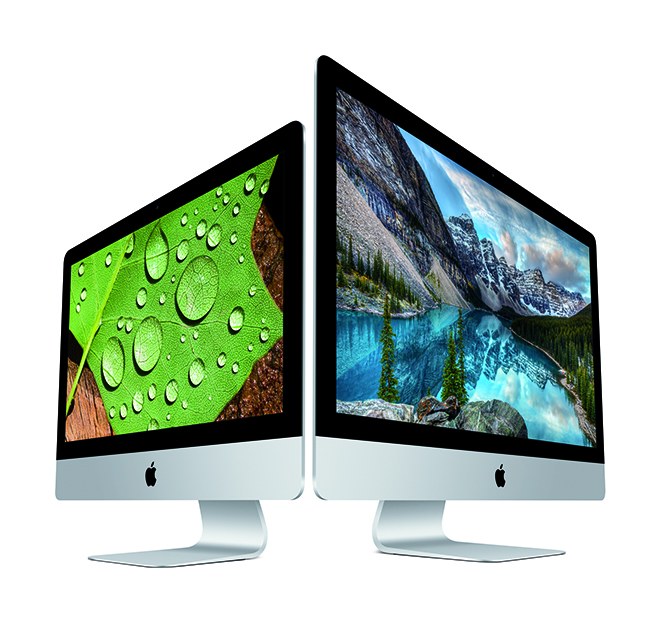
Engadget: “The iMac continues to be the best all-in-one a computer with an attractive design, almost standard 4K and 5K displays and even higher color accuracy than before. The 21,5-inch version is more interesting in some ways, as it's the first time you'll find a smaller Mac Retina display. As you can see, the iMac managed to hit the nail on the head, but Apple could have been a little more generous in other aspects. The 21,5-inch version no longer offers a separate graphics card, even with a 4K display, which I think is a mistake. Fusion Drive instead, it's standard only on models over $2000."
Macworld: "When four pixels do the same job that only one used to do, OS X El Capitan looks really beautiful. Everything is sharper. Photos look surprisingly vivid, almost as if they were printed on paper. And then there's the sharp font that looks like it just came off a laser printer. Even the toolbars and icons in Docku look much nicer because all the graphics got better details that could not be displayed at a lower resolution. The basic configuration of the 4K iMac offers a 5400-rpm 1TB hard drive. It's been a few years since I used a spinning disk as my primary and believe me, it was slow. It was slow to turn on. Apps were slow to launch. Everything… in short… took… longer. It's quite disappointing to me that a brand new, fresh out of the box, the most powerful iMac in its class is slow.”

Mashable: "Apple changed the way Fusion works Drive in 2015. To make the drive cheaper, Apple paired a 1TB drive with a 24GB SSD. In the past, he combined it with a 128GB SSD. Now, if you want a 128GB SSD in your Mac, you have to pay extra for a 2TB or 3TB Fusion DriveThe advantage of the new Fusion Drive is that its most important feature, higher fluency, is now available to everyone. The downside is that for documents and applications you don't have on the SSD, you won't see any difference due to the smaller cache."
Tech Insider: “It's not just about resolution. The displays on the new iMacs also have better colors. But the average user probably won't notice it. I myself had to put two Macs side by side and compare them to see the differences. The function is, of course, good for photographers and professionals who work with video, but it's nothing world-shattering for ordinary users who occasionally want to edit a photo they took with an iPhone. But at least you know that Apple he took care and gave you a really nice display, even if he didn't have to. There's nothing wrong with that.”
The Wall Street Journal: "When you look at these new displays, the reds and greens look brighter and more vibrant, as if someone pushed the saturation level to 11. Because there are up to 25% more colors supported, there's more detail captured, as the display can show shades that it couldn't show before. When I put the old and new iMacs side by side, I noticed the difference immediately in some photos, but not everywhere. Prothe problem with many of our iPhone 6s photos is that they use a reduced sRGB color palette. To take advantage of the potential of the new displays, you need to have photos and videos with DCI-P3 formats (It's no coincidence that the Photos app now supports this format, but you need to start with quality DSLR photos). Despite the many improvements, I noticed two mysteries here. First of all, despite the back having a bunch of ports, there's no USB-C found on the new MacBookua is used here for charging and connecting peripherals (even if it was controversial). The team that Apple didn't use USB-C on the new iMac, we doubt that Apple trusts in USB-C as the future standard.”
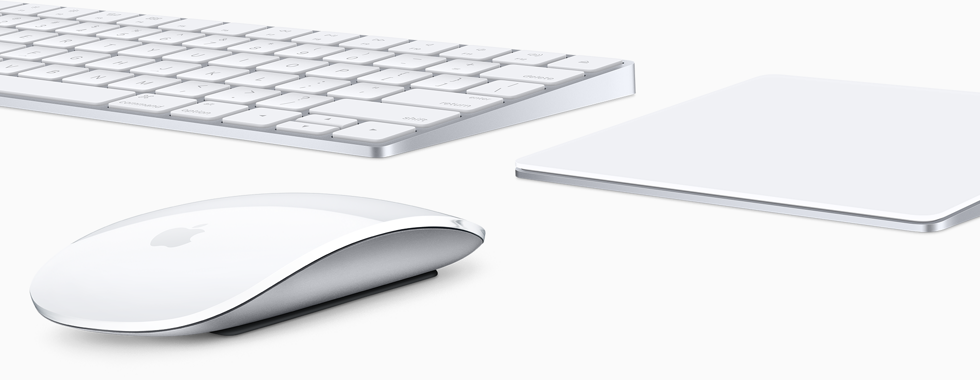
The Wall Street Journal also took a look at the new accessory, which today Apple after months of speculation, he officially introduced – Magic Keyboard, Magic Mouse 2 to Magic Trackpad 2: "I didn't have aancu try how long the batteries last, but Apple they say that for all three they last about 1 month on a single charge, and for the mouse, 2 minutes of charging is enough for 9 hours of work with clicking and moving around the screen."
*Source: MacRumors





They totally killed it with that disc!! It's just unbelievable, 2015! :-/
I'm more concerned about the graphics card when I buy a computer, even though it's really amazing for almost 50, so I'd like to play on it sometimes, and I don't mean games like mines or Luxor, which Iriska will start. HOld, I'll stick with the corporate Dell for a while longer.
It's really unbelievable that these days they put out classic disc drives that degrade the computer by 4 classes below. I myself have an iMac 21,5″ late 2013 and the first thing I did a week after buying it, even at the cost of losing the warranty, was to replace the disk with an SSD. The difference is unreal. Of course, anyone who wants can order an iMac with an SSD, but then again, the price...
Erm… OWC has torn down the new 21.5-inch 4K Retina iMac and has learned that the memory is soldered in, which means it can't be upgraded. Customers purchasing a 21.5-inch Retina iMac should get the maximum amount of memory they can afford at the time of purchase as there will be no third-party upgrade options. The maxThe maximum amount of RAM for the 21.5-inch iMac models is 16GB.