
Keyboard SwiftKey was very popular, especially on devices with the Android mobile operating system. With the advent of iOS 8 and with the fact that Apple enabled third-party keyboards in this version of the system SwiftKey immediately got into it too iOS App Store. It immediately gained popularity and favorability here and today it is one of the most used third-party keyboards for iOS. SwiftKey scores points mainly because it brings a completely new style of typing by swiping your finger across the keyboard, called Flow, which generally speeds up typing on mobile phones. However, the developers are not sleeping and are bringing other interesting updates for their keyboard, as evidenced by the latest update, which brings interesting news.
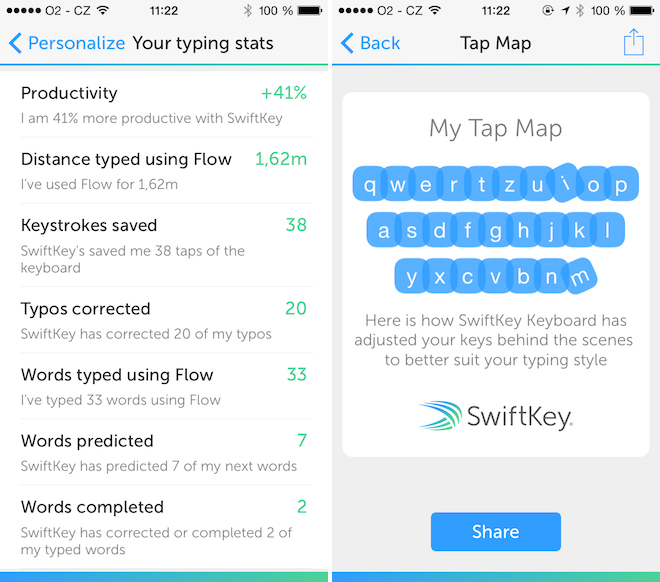
It is new. SwiftKey has been enriched with statistics and a keystroke map. This means that it will show you which key you pressed most often, as well as how many meters you moved on the keyboard, how many times the application corrected a word for you, how many keystrokes you saved, and so on. Also interesting is the new feature called Tap Map. It will show you how the keyboard is laid out in the background. In practice, the keyboard works in such a way that it always shows you the same layout of keys and thus the entire keyboard, but in the background it is adjusted so that each key is of a different size depending on the one you use most often and also mainly depending on how much you click. The algorithm itself deduces how it should enlarge and rotate the key so that you don't tap so much. You can now not use the key in the backgroundchat display in the aforementioned Tap Map and you can share it further.


It's my favorite keyboard, but sometimes it annoys me that it won't pop up. In short, the optimization could be even better and adding more topics like 2 would also not be bad. Anyway, whispering words as they learn is second to none!
I liked the Swype keyboard, but I also have the problem that sometimes it doesn't pop up :-( – and it's sometimes very annoying.
ProSo both Swype and SwiftKey it looks like some kind of error in iOS, I would say...
The mistake is clear- Apple saves a few cents on RAM memory and the alternative keyboard has a lower priority, so the system 'shoots' it among the first. It is also annoying that if you want to send a picture and you do it - Picture/ share option/message, the box for selecting the recipient will not appear at the top, engineers Applu probably made a mistake somewhere. And that's not counting the daily freezing of the SMS application. It applies to my 5S with Swype and Swiftkey. This works longer and better for Android users.
Oh, thanks for the explanation. That's really food for thought and I hope it's in the ios 9 will fix it! Or at least add Czech prediction to the native keyboard!