
The Thunderbolt Port can support up to six daisy-chained devices connected to a single port. Mac Pro has six Thunderbolt ports, four more than any other Mac. Plus Mac Pro It also has four USB 3.0 ports, one HDMI port, and two Gigabit Ethernet ports. So the question is, how many devices can you connect to your computer at once? Mac Pro? This was also of interest to the server editors, among others. Macworld and so there was no choice but to try it.
In total, it was possible to connect 36 disks, of which 19 were connected via Thunderbolt, 15 via USB and two via FireWire 800. The total capacity of the disks was 100TB. In addition to the drives, Macworld also attached two Thunderbolt docks from Belkin, Apple Thunderbolt Display, two displays Apple Cinema and one HP Z27i display. All of this was connected to just one Mac ProWhile some drives could be powered directly from the port, most of them required external power, so there was no choice but to connect 24 power cables to three extension cords.
To make the test even more interesting, the editor connected a power meter to each extension cord while running the script, which copied data from the internal drive. Mac Pro to external drives, peaked at an incredible 865 Watts. For comparison, the latest version of the iMac computer consumes 0,9 Watts in sleep mode. What is incredible, however, is the fact that even though the entire system slowed down, it was able to Mac Pro still work and OS X worked even after an incredible amount of all devices were connected.
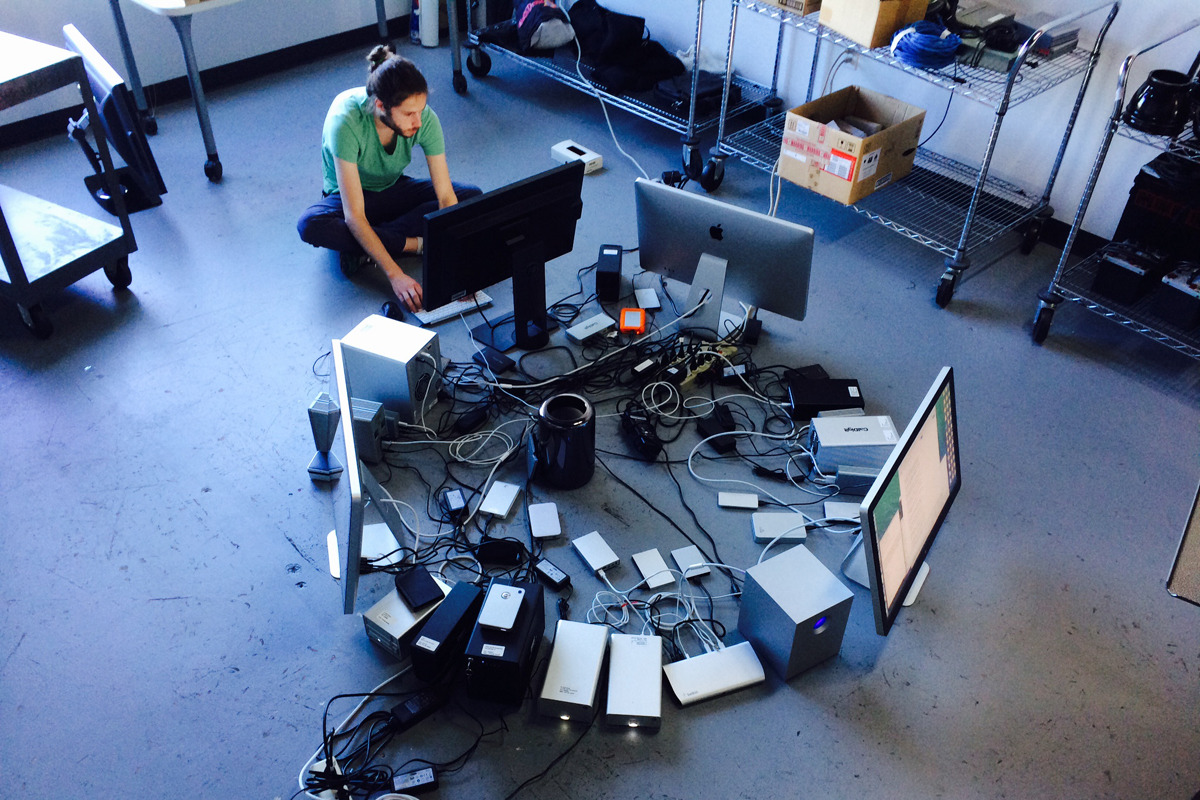
*The photo comes from the server macworld.com
Complete list of all connected external drives to one Mac Pro
- Adata DashDrive SE720
- Akitio Neutrino Thunder D3
- Apricorn Aegis Portable 3.0
- Buffalo DriveDDR Station
- Buffalo DriveStation Duo
- Buffalo DriveStation Mini Thunderbolt SSD
- Buffalo MiniStation Extreme
- Buffalo MiniThunderbolt Station
- CalDigit T3
- CMS BounceBack
- Elgato Thunderbolt Drive+
- Elgato Thunderbolt SSD
- G-Technology G-Dock ev with Thunderbolt
- G-Technology G-Drive Mini
- G-Technology G-Drive USB
- G-Technology G-Drive mobile with Thunderbolt
- G-Technology G-Drive Pro with Thunderbolt
- G-Technology G-Raid
- ioSafe Rugged Portable
- LaCie 2big
- LaCie 5big
- LaCie Little Big Disk 1TB SSD
- LaCie Little Big Disk 240 SSD
- LaCie Little Big Disk 2TB hard drive drive
- LaCia P'223
- LaCie Rugged USB
- OWC Envoy Pro EX
- OWC Mercury Elite Pro Dual
- OWC Mercury Helios
- OWC ThunderBay IV
- ProPegasus R6 mission
- Seagate Free Agent FW
- Toshiba Canvio Slim II
- Western Digital My Book VelociRaptor Duo
- Western Digital My Passport Pro
- Western Digital My Passport Slim


You don't even want to believe it :D
Hell...as my cousin says...!
Quite a feat and hats off to the engineers Appyou.
I don't see how it works specifically on a Mac, but on a PC (Win) the drive letters would run out somewhere in the middle ;-)
I would be quite interested in the consumption of individual Macs in different conditions, that is, when sleeping, during use and under load...
Possible comparison with a regular PC/Notebook in a similar configuration or averages of regular laptops vs. MacBooky, average iMacs vs top PC Desktops, etc... I would welcome such an article in the future :)
na windowsand with 36 disks, only viruses would be happy, less so an antivirus program and least of all the type located between the keyboard and the table