
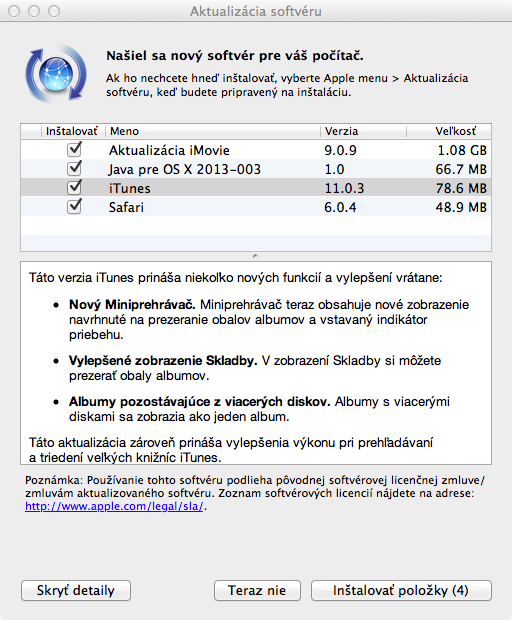
Company Apple released a new update to iTunes 11 media player today, which has upgraded iTunes to iTunes 11.0.3. Although this is only a minor update, it brings some very interesting news. The update is available directly via Software Update or right hereThe new iTunes version 11.0.3 also brings new features, including: Miniplayer, which now includes a view that brings album art and a built-in progress indicator for the song. The song view itself has also been improved, allowing you to view album art. Albums with multiple discs, such as The Wall by Pink Floyd, are now displayed as a single album, but of course contain songs from both discs.
Apple thus further improves the new version of the multimedia player, which, in addition to the above-mentioned novelties, again brings improvements in performance and stability.
.


Even after the update, the option to display purchases in the settings under the shop tab disappeared cloude?
I've had enough of this stuff, if that's the case, then I'll go back to the previous version.
UPDATE: After restarting, it works for me. Out of date, thanks.
Great update. MiniThe player can be used for everything again :)
The division of albums or merging rather depends on how it was tagged. In the case of a purchased double album, where the tag was 1 of 2 and 2 of 2 and it was previously undivided, it will instead be divided into 2 sub-albums.
http://zkrat.me/rf
How can I view album art in the Tracks view?
I have nothing here. There used to be a picture in the lower left corner, but they canceled it a long time ago.
Speaking of improved album display, I'm still having an issue with the album art display for purchased music on my iPad. Does anyone have a similar problem seen in my video?
Video here: http://youtu.be/6B1M1GzcWwY
Jarys: it happened to me on iPhone. I deleted it from it and synced it from iTunes again and it helped, maybe I threw it out of the itunes library and put it back, I don't remember that, try it.
Jarys: assign an album art to each song in that album. Then it will be displayed correctly.