
In the previous article, we looked at how to measure your data usage and avoid problems with your FUP limit. Now it's time to look at how to save as much data as possible and transfer as little data as possible. Pro More experienced users may not find the article very interesting, but for many others it may be very useful. The first thing to remember is that multimedia, especially videos, have the greatest data transfer requirements.
Aside from downloading from iTunes App Store or iTunes Store and iBooks, we will use up our data limit the fastest when playing videos or viewing photos. Of course, this also applies the other way around, so we will have the same consumption when uploading videos and photos to various servers and social networks. So avoid working with multimedia and rather postpone it until you are connected to Wi-Fi. If you have to play a video, always choose the lowest possible quality. Remember, the lower the quality, the lower the data flow and the lower the data consumption from our FUP limit.
Surf smart
When browsing websites, choose to view the pages in their mobile version if the site allows it. This is essentially a relic from the WAP era, when websites had specially modified codes for viewing on mobile phones.onech. Currently, the mobile version of the site is understood as a display ideal for the resolution of smartphones or tablets, which in most cases only displays a limited number of advertising banners and other data-intensive objects. The developers' goal is to offer you maxminimum amount of content with minilow data transfer load.
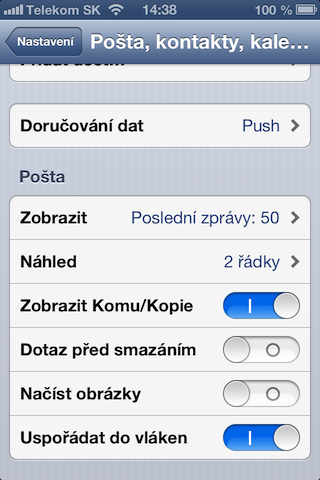
What we can influence directly by phone settings are items that, although at first glance, seem relatively insignificant, data is also accumulated from the settings listed below as part of the monthly use of the phone. If you really want to save data, turn off Data delivery and mail, that is, check emails manually. All you have to do is always open the mail application and manually check whether a new mail has arrived. If you want to keep Push, turn on monitoring for new emails once an hour. Again, a simple rule applies, the more often you check for new mail, the more communication takes place between your device and the server, and the less data is transferred. Overall, however, by turning off notifications and push notifications for e-mails, you won't get much data savings, so it depends only on you whether it's worth losing these functions within the saved 3-5 Mb per month.
Nestdownload email attachments automatically
However, much more interesting settings can be found in Mail, contacts, calendars. Here you will find the option to load images, which you should definitely turn off, that is, if you value your data. Nothing pleases more than an email containing several photos with a total size of, for example, 10Mb, which is automatically downloaded. You can avoid all this by using the Load images function. Email attachments in any format are only displayed as a preview of the attachment, but you can download it manually only when you touch the attachment. This function can save a really large amount of data and basically doesn't limit you in any way, because in most cases it doesn't matter whether the images or other attachments are loaded automatically or only after you touch them.

|
|

I have a 5GB FUP and it still bothers me nestI usually finish it about a week before the end, but it's true that sometimes I share the net with others. macbooku
I have 1,2 GB and it is enough for me. So I really only share the Internet exceptionally because I don't have a laptop, but otherwise I don't limit myself in any way... I don't overdo it either. I have enough internet at work and at home, it's hard for me to get enough.
Use Opera. It's not the most efficient, but it downloads much less data.
I have a 150 tariff with a very small FUP and it's usually enough for me to surf for up to 3 days all day. I only feel the slowdown when the signal is weak. Of course nestI'm sorry, the video is choppy, but surfing and maps are fine even without Opera.
I would note that push and picking up emails are two different things. I read somewhere that pickups connect to the server at a given interval and update the data, whether a new mail has arrived or not.
push means that the server itself pushes the mail to the iDevice exactly when it receives the mail.
in addition, I have verified that push consumes less battery than picking up
Of course, provided that push works correctly and not as in the case of server icloud, where I personally still have a problem getting the mail when it arrives. so I have to ucloudI have FETCH set so I don't miss an important message...
that's why I don't play videos on the paid internet, I have 500mb of data, which is enough for the internet and e-mails, but as soon as I go to itunes, appstore or youtube like that miniper day
The simple solution is NEKONEHAPPY INTERNET :).
XX
:D only in Slovakia they will tell you unlimited and you have 2 GB in telecom precerpes and you have a speed of 128 kilobits per second :D you can't even load the website :D
RE: Amnart Exactly, but as I always somehow fit into that limit, I only use it when I travel, everywhere else I have faster and more convenient access.
I rather meant that if I overcharge, no one bothers me with an invoice for additional services.
OT.
Does anyone have a problem with the phone overheating iPhone when using mobile internet? I mean surfing through Safari, watching videos on YT. I have a phone iPhone 5 and mobile 3G internet from Orange SK. I had a problem on another phone as wellone Sony Ericsson brands with the same internet. Is this a normal phenomenon?
Thank you.
ID0:
It certainly does to me. iphone 4S, when you use 3G for more than 10 minutes, the phone starts to heat up, it does the same thing to me when I turn on the map application
ID0
it's normal
this Amnart:
Yes, exactly. It's about 10 minutes. Compared to surfing via Wi-Fi, there is a diametric difference. It also happened to me on the SE Xperia, so it shouldn't be just a problem iPhone-at. Maybe the problem is that we have Slovak operators. :D
But I read Apple support and there were a lot of complaints about a similar problem. The suggested solution was restart, reset, erase, reset and so on until the problem is solved. It didn't help me.
I'll sum it up like this (based on my experience with SE Xperia) that it's either a problem only with our operators, or it's a normal phenomenon. I rather lean towards the second possibility. And it's the same with GPS. It doesn't matter if you have aluminum or plastic on the back. I can feel the heating even through time. Thanks a lot. Hold on!