
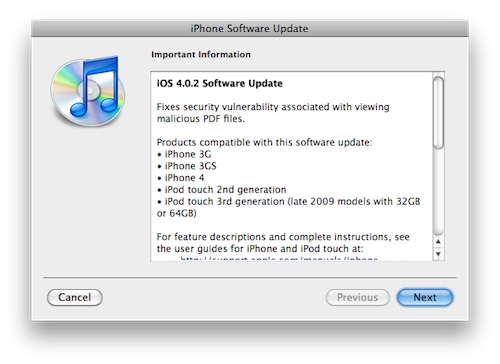
Apple released a patch for the operating system iOS 4.0.2, which runs on iPhone 3G, iPhone 3Gs, iPhone 4, iPod touch 2nd and 3rd generation. In addition, he also released iOS 3.2.2 for iPad. The update addresses a security vulnerability that was associated with viewing PDF files that could be malicious and infect your portable device. So far, the update does not appear to affect other system-related or iPhone 4 for example light sensor). iPhone The update is 580MB in size and the iPad update is 457MB.
This also ends the possibility of jailbreaking via the domain jailbreakme.com. Jailbreak for new versions iOS is not yet available, so if you want to use Jailbreak, do not update your device yet. Updates are available for free via iTunes – Check for update. If you prefer to choose the manual update option, which means downloading the file to your Mac/PC and then selecting the downloaded file when searching for updates, you can check the individual iOS download here:
- iPhone 3G - 4.0.2 (8A400)
- iPhone 3Gs – 4.0.2 (8A400)
- iPod touch 2nd generation – 4.0.2 (8A293)
- iPod touch 3nd generation – 4.0.2 (8A400)
- iPad - 3.2.2 (7B500)
- iPhone 4 - 4.0.2 (8A400)
iPod touch 1st generation and iPhone 2G
What impressed me most as an owner of the first generation iPod touch (I use it exclusively as a music player) is the absoluteonec support for this device and also for iPhone 2G. Yes, of course it has already been discussed and Steve Jobs he said he wouldn't Apple continue to develop system updates for these devices. What I didn't understand though, why if Apple made a mistake that he acknowledged and these devices also contain it, why didn't he release a free update for this mistake for the 1st generation iPod touch and iPhone 2G. In other words, as the owner of this device, I see it as a mistake, but you have an old device and if you don't buy a new one, it's absolutely stolen from us whether it will jeopardize your privacy, data, or otherwise damage this device or your personal information, because your device is 3 years old! That's a strange attitude considering that I paid over 12,000 CZK for this iPod…… Vlada Janeček offers instructions on how you can secure these devices yourself:
- Install on iPhone OpenSSH (if not already installed),
- download this .deb file,
- copy it via an SSH client (for example the well-known Cyberduck) to the /private/var/mobile/ directory on the iPhone,
- run Terminal and enter these commands:
ssh root@IPADRESAIPHONU

alpine (nebo zadané heslo)

dpkg -i com.willstrafach.pdfexploitwarner_1.0.0-4_iphoneos-arm.deb - Restart your phone and you're done.

When will it be? iOS4 for iPad?
When will it be? iOS4 for iPad?
iOS4 should be available for iPad in the fall/winter. :-)))
iOS4 should be available for iPad in the fall/winter. :-)))
I heard something about autumn, it was talked about on WWDD (I don't know if the abbreviation is correct, but we probably have an idea of what it is;-)
I heard something about autumn, it was talked about on WWDD (I don't know if the abbreviation is correct, but we probably have an idea of what it is;-)
I would say that at the beginning it dawned.
Unfortunately, the last information is from November 2010 :(
I would say that at the beginning it dawned.
Romanand thanks for the instructions at the end. iPhone I don't have a 2G anymore, but it's a great device, slightly smaller in size compared to the current 3G/3GS version, what I really liked was the aluminum construction. The reason I switched to the 3GS was mainly the GPS (TomTom somehow asked about a mount with integrated GPS, otherwise I would probably have a 2G by now) and I also didn't enjoy constantly waiting for someone to unlock my 2G, I had a piece originally from the USA.
Romanand thanks for the instructions at the end. iPhone I don't have a 2G anymore, but it's a great device, slightly smaller in size compared to the current 3G/3GS version, what I really liked was the aluminum construction. The reason I switched to the 3GS was mainly the GPS (TomTom somehow asked about a mount with integrated GPS, otherwise I would probably have a 2G by now) and I also didn't enjoy constantly waiting for someone to unlock my 2G, I had a piece originally from the USA.