Whether you're going on a weekend trip, driving through a new city to find the right food, or trying to avoid traffic on the way to school, Google Maps and Waze will show you the information you need to get to your destination in the best way possible. Today, Google has added even more useful news to keep you safer and more informed on the road.
Easier to report events in Maps to help your community
Let’s say you’re driving and traffic suddenly comes to a standstill. To help keep your fellow drivers informed on the road, Google is making it easier for you to report incidents and helpful information like nearby construction, lane closures, objects, and police presence in Maps—these reports come from the Maps and Waze communities, and you can even see which app the report came from. You’ll see larger, easier-to-tap report icons so you can share the latest information faster—like a closed lane blocking traffic on your commute. Other drivers can then tap to acknowledge the incident and help passersby. This improved way to report incidents in Maps is now rolling out globally on Android and iOS, in cars with built-in Google system, Android Auto a Apple CarPlay.
Take the stress out of getting to your destination with new directions in Maps
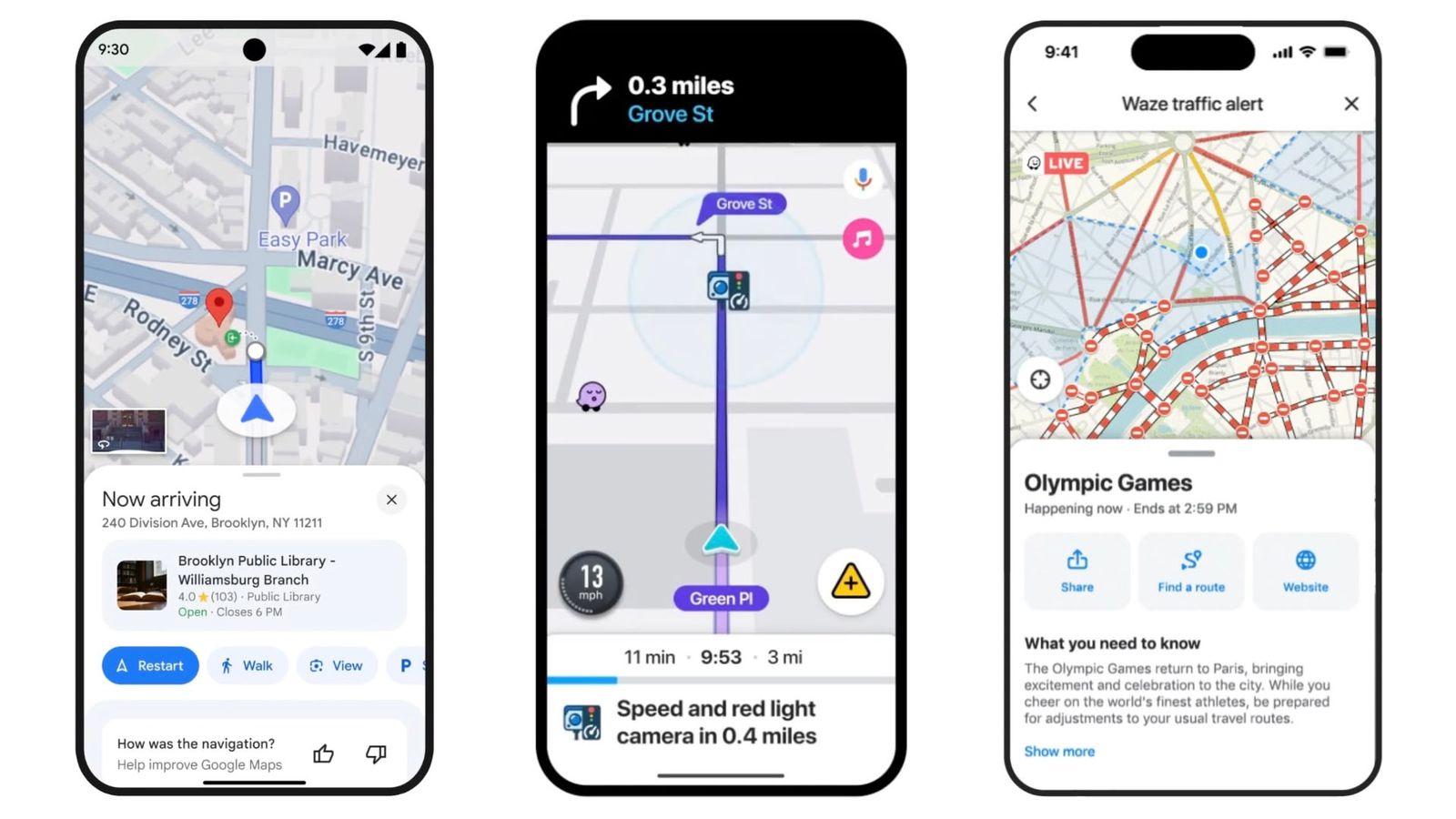
Navigating new buildings—like a friend’s large apartment complex—can be confusing when you don’t know where to enter or where to park once you arrive. Now, when you’re driving to a location, new turn-by-turn directions in Maps will automatically light up the building and its entrance as you approach it, and also show you nearby parking lots. This can be especially helpful if you’re heading to an unfamiliar location in the dark or late at night. Turn-by-turn directions in Maps will start rolling out globally to Android and iOS in the coming weeks. iOS, cars with Google built-in, Android Auto a Apple CarPlay.
Stay alert while driving with new camera alerts in Waze
Some cities around the world are adding cameras to enforce things like speed limits or lane keeping. To help you stay more informed and comply with local laws while you drive, we’re adding the ability to view new types of cameras in the Waze app. These alerts are provided by members of the Waze community, who use a combination of real-world road information and publicly available data from local authorities to update the map. For example, you’ll now see an alert if you’re approaching a camera that’s taking pictures for things like speeding, running a red light, using the wrong lane (such as a bus, HOV, or carpool lane), not wearing a seatbelt, or using your phone while driving. These alerts serve as a helpful reminder of the traffic laws in your area so you can make the necessary adjustments. The new camera types in Waze are rolling out globally on Android and iOS.
Share real-time traffic information with friends in Waze
Events like parades, concerts, and sporting events are fun, but they can also cause traffic jams on the roads. With the new Traffic Events feature in Waze, you can get a better idea of how these events are affecting traffic in your area. If you've recently driven through an affected area or have places saved in Waze near it, you'll get a notification when an event starts. Maps will now show you helpful details like the cause of the event, whether there are road closures, and real-time traffic conditions. And to help your friends and family, you'll be able to easily share these details with them so they can be better prepared for their own journeys. The new Traffic Events feature in Waze is now rolling out globally for Android and iOS.
Lock screen navigation with Waze
To help you navigate more comfortably, drivers can now use Waze navigation—like turn-by-turn directions, real-time traffic updates, and hazard alerts—while their phone remains securely locked. Lock screen navigation is launching globally in Waze on Android this month, and will be coming to Android in the fall. iOS.
These new features and helpful alerts in Google Maps and Waze will help you stay informed on all your journeys. Now you just need to equip yourself, for example mobile phone holder in the car.