
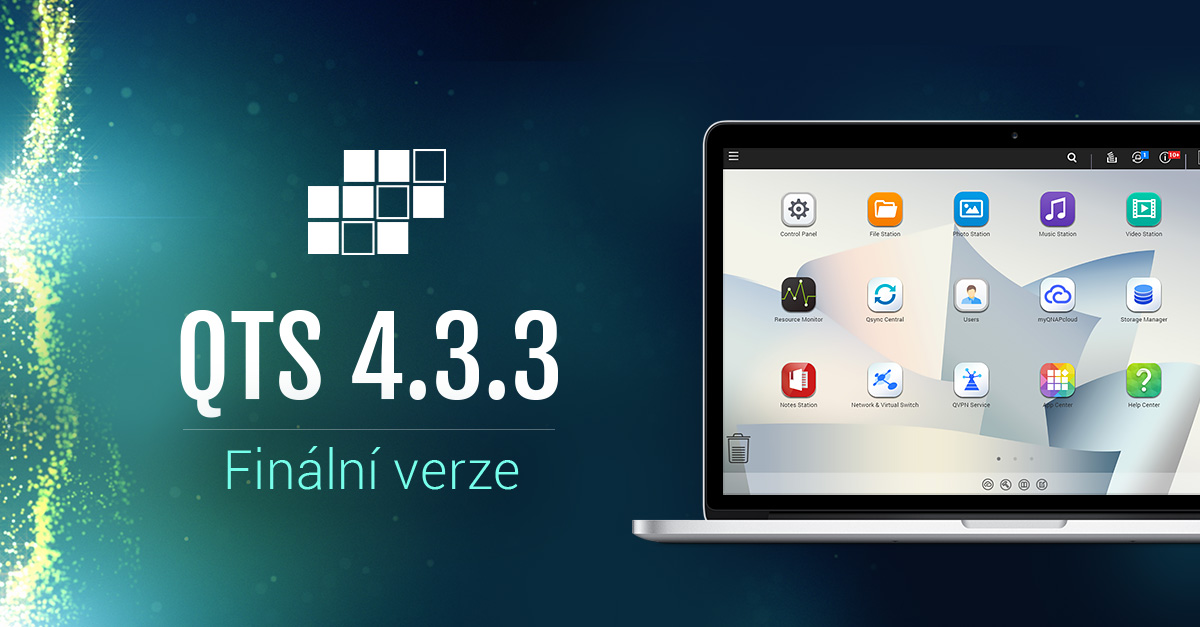
Company QNAP® Systems, Inc. today officially announced the release of QTS 4.3.3 – a smart operating system for NAS that helps users achieve much more at work and at home. Along with a more efficient user interface, QTS 4.3.3 also offers more "intelligence" when using NAS and applications.
“QTS 4.3.3 is based on the concept of ‘intelligence in motion’ and brings a range of competitive features to support smart access and efficiency,” said Dylan Lin, product manager at the company. QNAP, and added: “Since the release of QTS 4.3 Beta Our development team has been working to improve the usability and functionality of QTS to better meet user needs.”
Major new apps and features in QTS 4.3.3:
- Visual and clear monitoring of system resources:The all-new version of Resource Monitor includes useful graphs and additional metrics for better analysis and management of resource usage and storage performance.
- Intelligent Qtier™ 2.0:Qtier brings an intelligent optimization module and can understand NAS usage, analyze system performance and peak usage time to determine the best time and optimal transfer rates for automatic data positioning.
- Maximal network access thanks to the Network & Virtual Switch function:This feature allows NAS servers, virtual machines, and containers to share the same local LAN port. It also supports the Thunderbolt™ to Ethernet (T2E) adapter and the Thunderbolt Virtual Switch NAT service, which allows Thunderbolt devices to access network resources over QNAP Thunderbolt NAS.
- Backup Time Machine via SMB protocol: QTS 4.3.3 supports seamless compatibility with macOS Sierra, including SMB network protocols for advanced backups.
- Compatibility with exFAT: Users can purchase a license that provides compatibility with the exFAT file system to directly access and edit files stored on exFAT-formatted storage using QNAP NAS and creating a flawless workflow for editing online media.
- Qfiling for automatic file organization:Qfiling automates the organization of files - just enter file sorting conditions, set a schedule, and files will be organized and archived based on your settings.
- File Station brings remote connections functionality:Users can directly browse and convert files between QNAP NAS server and public services cloudYou can mount shared folders from a remote NAS server to a local NAS using FTP and CIFS/SMB protocols. QTS 4.3.3 supports Google Drive™, Dropbox®, Microsoft® OneDrive®, Box®, Yandex® Disk, Amazon® Drive, Microsoft® OneDrive® for Business, and HiDrive®.
- Backup from USB/SATA optical disc drives: Users can connect a compatible USB/SATA optical disk drive to the NAS server and directly access / copy the contents of the inserted disks to the NAS shared folder via the File Station application.
- Enhanced multimedia experience:All multimedia-focused applications have an improved user interface; Music Station boasts a new Spotlight mode and support for smart playlists; Video Station allows you to tag scenes, switch audio tracks, and download additional data from online databases such as TMDb. QTS 4.3.3 also provides multi-zone and multimedia controls for multimedia applications. Download Station now offers an integrated BT search engine.
- More productivity apps and tools: QmailAgent enables central management of multiple email accounts and IMAP servers; Qcontactz helps you centrally manage your growing contact list across multiple devices and platforms; Qsync has been enhanced with a new team folder structure and auto-restore feature, significantly improving synchronization stability and speed; IFTTT Agent enables productive workflow automation using QNAP NAS; QTS Help Center facilitates customer support and provides optional remote connection service for technicians QNAP for troubleshooting NAS issues over a secure connection with support for 256-bit SSL encryption. For more useful apps and tools, visit the QTS App Center.
More information about the QTS 4.3.3 system and its features can be found on the website https://www.qnap.com/qts/4.3/en/index.php
Note: Features are subject to change and may not be available on all models. QNAP IN THE.
Availability and compatibility
QTS 4.3.3 is now available for the following models QNAP IN THE:
- With 30 shafts:TES-3085U
- With 24 shafts:SS-EC2479U-SAS-RP, TVS-EC2480U-SAS-RP, TS-EC2480U-RP
- With 18 shafts:SS-EC1879U-SAS-RP, TES-1885U
- With 16 shafts:TS-EC1679U-SAS-RP, TS-EC1679U-RP, TS-1679U-RP, TVS-EC1680U-SAS-RP, TS-EC1680U-RP, TDS-16489U, TS-1635, TS-1685
- With 15 shafts:TVS-EC1580MU-SAS-RP
- With 12 shafts:SS-EC1279U-SAS-RP, TS-1269U-RP, TS-1270U-RP, TS-EC1279U-SAS-RP, TS-EC1279U-RP, TS-1279U-RP, TS-1253U-RP, TS-1253U, TVS-EC1280U-SAS-RP, TS-EC1280U-RP, TVS-1271U-RP, TVS-1282, TS-1263U-RP, TS-1263U, TS-1231XU, TS-1231XU-RP, TVS-1282, TVS- 1282T2, TVS-1282T3
- With 10 shafts:TS-1079 Pro, TVS-EC1080+, TVS-EC1080, TS-EC1080 Pro
- With 8 shafts:TS-869L, TS-869 Pro, TS-869U-RP, TVS-870, TVS-882, TS-870, TS-870 Pro, TS-870U-RP, TS-879 Pro, TS-EC879U-RP, TS-879U-RP, TS-851, TS-853 Pro, TS-853S Pro (SS-853 Pro), TS-853U-RP, TS-853U, TVS-EC880, TS-EC880 Pro, TS-EC880U-RP, TVS-863+, TVS-863, TVS-871, TVS-871U-RP, TS-853A, TS-863U-RP, TS-863U, TVS-871T, TS-831X, TS-831XU, TS-831XU-RP, TVS-882T2, TVS-882ST2, TVS-882ST3, TVS-873
- With 6 shafts:TS-669L, TS-669 Pro, TVS-670, TVS-682, TS-670, TS-670 Pro, TS-651, TS-653 Pro, TVS-663, TVS-671, TS-653A, TVS-673, TVS-682, TVS-682T2
- With 5 shafts:TS-563, TS-569L, TS-569 Pro, TS-531P, TS-531X,
- With 4 shafts:IS-400 Pro, TS-469L, TS-469 Pro, TS-469U-SP, TS-469U-RP, TVS-470, TS-470, TS-470 Pro, TS-470U-SP, TS-470U-RP, TS-451A, TS-451S, TS-451, TS-451U, TS-453mini, TS-453 Pro, TS-453S Pro (SS-453 Pro), TS-453U-RP, TS-453U, TVS-463, TVS-471, TVS-471U, TVS-471U-RP, TS-451+, IS-453S, TBS-453A, TS-453A, TS-463U-RP, TS-463U, TS-412, TS-412U, TS-419P, TS-419P+, TS-419P II, TS-419U, TS-419U+, TS-419U II, TS-420, TS-420-D, TS-420U, TS-421, TS-421U, TS-431, TS-431+, TS-431P, TS-431U, TS-431XU, TS-431XU-RP, TS-453Bmini, TVS-473
- With 2 shafts:HS-251, TS-269L, TS-269 Pro, TS-251C, TS-251, TS-251A, TS-253 Pro, HS-251+, TS-251+, TS-253A, HS-210, HS-210-D, HS-210-Onkyo, HS-219, HS-219P, HS-219P+, HS-219P II, HS-251+, TS-212, TS-212P, TS-212E, TS-220, TS-221, TS-231, TS-231+, TS-231P
- With 1 shaft:TS-112, TS-112P, TS-119, TS-119P+, TS-119P II, TS-120, TS-121, TS-131, TS-131P





Thanks for the notice. I have turned off the notification about new FW in my email and I recently updated from 4.2.4 to 4.2.5, so I almost didn't expect the new FW. Thanks again, I had both NASes updated.