
When they are in App Store some free apps available, always a pleasure. However, with such a large number of applications, one may not have an overview of what is discounted and what is not, and therefore one does not even know that one can download such an application for free that is really useful. Whether it is a special tool for notes and reminders or a tool for editing photos, one is quite pleased to have the opportunity to save a few cents or in some cases even a few euros. They are now on iTunes App Store available 3 interesting apps and games absolutely free and if you want to download them then download them as soon as possible.
One of the first applications that is built directly for iOS 8. It is essentially an application that reads information from your comments, so before it starts to function fully, you must first enable access to comments. After that, a very simple environment will appear on the screen, in which you can choose which list of reminders you want to have on the screen, whether you want to see scheduled reminders and finally how it should look like widget in the notification center. Two skins are available, compact and basic. How to add widgety to the notification center in iOS 8, you can read in our instructions.

|

|
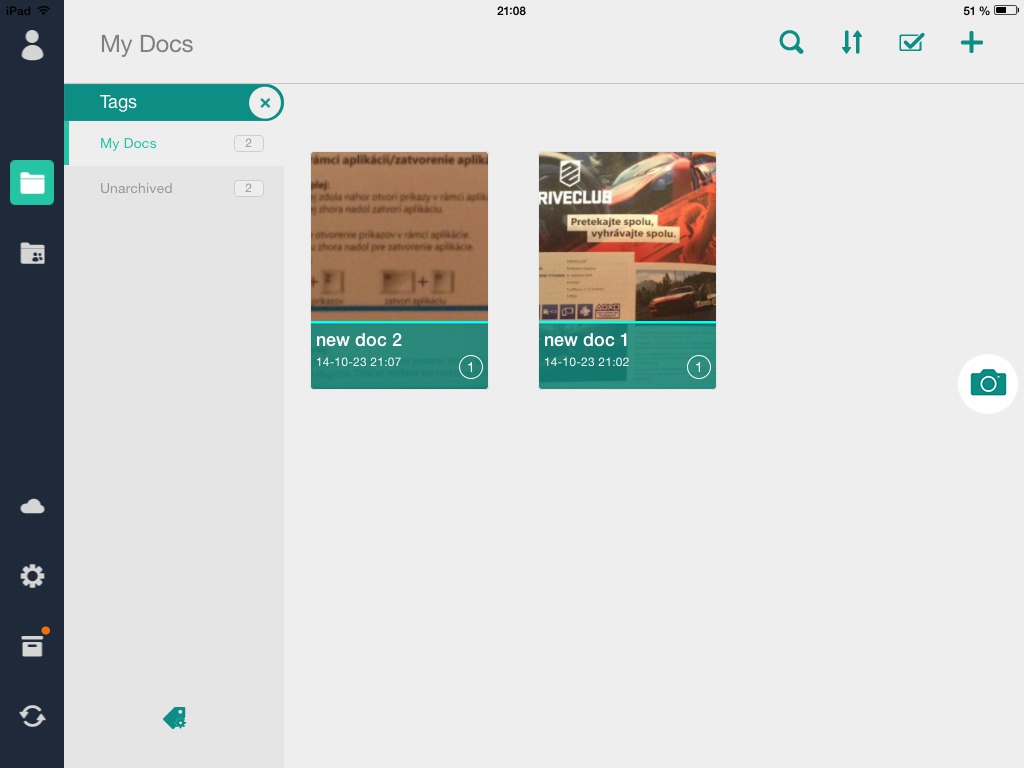
Scanning documents to the iPad is not exactly the easiest process today, and that's why there are applications today that can simplify this process. One of them is the CamScanner HD application Pro, which is available to all owners of iPad s iOS 7 or later. The application uses the camera on the back for its functionality (you see, you will still use it) by taking a photo of the paper with it, and the application then analyzes it itself and turns it into high-quality PDF documents or even allows text to be recognized so that it can be edited. There is also the option to share documents or access them via a smartphone or web application. However, for this you need to register and log in to CamScanner.
In addition to apps, it also made its way to games, and this is the game that is currently discounted from $19,99. This is a flight simulator, or a combat game, in which you sit behind the cockpit of a fighter jet and perform tasks in the 20 missions that await you here. In addition, in the game you will find a traditional RPG leveling system, with the help of which you will be able to improve your fighter according to your taste. The game also has features such as Game Center with trophy and challenge support and even an on-rail mode is available here for people who want to play the game comfortably. This game is supported on iPhone and also on an iPad with an operating system iOS 4.3 or later. So you will be able to install the game on your first iPad, if you happen to have one.



What kind of application is it from the first picture, how can you see the icons there?
Launcher
By name widgetIt looks like Launcher.
correction: probably this https://itunes.apple.com/cz/app/launch-center-pro/id532016360?mt=8
After all, reminders can be put in the notification center
no, it's LAUCHER, I just downloaded it in time
I can't find that launcher
It is a Launcher that was available in App Store a few days, then Apple he downloaded it because it bothered him that it allowed other applications to run
I am on AppStore found something similar, it's called Sevastian, it allows you to start Skype,Facebook,Twitter you can choose what you want there, it's something like the launcher, but it annoys me that there are square icons like on Android, I didn't quite understand it and it's a bit annoying that it's in Japanese, even when I write in the description that there's Czech and Slovak, but it still pops up in Japanese, which unfortunately still can't be changed
And what is such a launcher even good for? Can someone enlighten me? How could you live on your iPhones without such options before? How about launching applications from the lockscreen or just off the phone?
I want to start appto unblock iPhone – 1 step vs I pull NC 1 step = difference?
I am in appke and I want to start another one, then why do I need multitasting? Or home button? S home button 1 step who can I run, p launchpadm 1 step = difference? I really don't understand the point of something like this iOS good?!?!?
For example, I turn on mobile data from the lock screen with the team:
Step 1 Homme button
Step 2 – Notification Center
Step 3 – tap and I'm in the menu for turning on mobile data
if I didn't have it:
1. homme button
2. unlock screen
3. settings
4. mobile
…so I'm there 1 step earlier.
And there are many such cases….
Okay, it makes sense in theory, unless I think about what it's good for iPhone without mobile data?
The essence of the iPhone and the smartphone as such is disappearing.
What for? iPhone a iMessagewith, FaceTime, Weather, andCloud sync in general or also maps or appsocial networks or others that use data (9 out of 10 app)?
What does such a user need? iPhone, when he (doesn't) use it as dumpphone?
Why would someone tap every day to manage turning mobile data on and off, when if they don't want to use it, they turn it off and don't solve it? Why deal with it all the time?
I have never needed it and I have a cheap flat rate of up to €15, where after exceeding 1GB my speed is reduced and never as long as I have nestI reamed not even 3/4 and I don't save it at all, I don't turn it off (I've never turned it off in my life - why? it goes against the principle of a smartphone), sometimes I even download apps or their update, maybe that's why I can't understand it. Also like that appto music as in the picture or youtube. I don't resist an explanation, I don't judge and I'm an understanding person, I just want to know "why?" because I really don't see a real reason, on the contrary, only chaos in NC and v iOS.
@Majdy: I don't understand it either, but then I came across guys who say - well, it eats up the battery, when I'm at home on wifi and have data turned on, I just turn it off. But that's such a miserable percentage of the energy saved, which you still use just for turning it on and off. ProYou are androids.
There is another reason to turn off mobile data – roaming data fees, I turn off data myself if I am outside the Czech Republic.
Grasshopper:
For this reason, data is turned off by default in the system, so why screw up NC because of something like that?
And if I go abroad often, then of course I need data, and at today's prices for these services?
Another irrelevant reason, based on what vegasgeek writes, just androids.