
Handoff a Continuity are practical features that are part of iOS and OS X Yosemite. These two systems will connect like never before and improve overall collaboration and connectivity. Initial reactions to these features were positive, but they also pointed out that it is not always possible to establish contact and use the mentioned features. But this will hopefully improve with the final version of Yosemite, which is already available today in Mac App Store, and with the new iOS 8.1, which comes on Monday.
Handoff will come in handy if you want to start writing in, for example Pages na iPhone and complete your work on your Mac. This utility is used by applications like Mail, Safari, Maps, Messages, Reminders, Calendar, Contacts + some third-party apps.
But first, make sure you have the latest systems installed – iOS 8 and OS X Yosemite and that you are logged in with the same account in iCloudUnfortunately, not all devices with iOS 8 support these features – only supported iPhone 5 and later, iPad 4, iPad Air (2) iPad mini and iPod touch (5th generation).
Here is the procedure for Handoff:
- Turn on Bluetooth on your devices and log in to iCloud
- Use one of the apps mentioned above
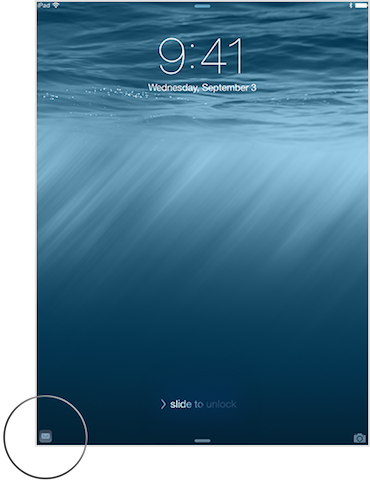
- On your other device, you will see the icon of the application in use (on iPad, after turning on the display, in the lower left corner, and on Mac, in the icon Finder)
Calls and messages
To make and receive calls from your iPad or Mac, follow these steps:
- Both devices must be running on the same Wi-FI
- Both devices must be signed in to the same FaceTime account
- Wi-Fi calling must be turned off
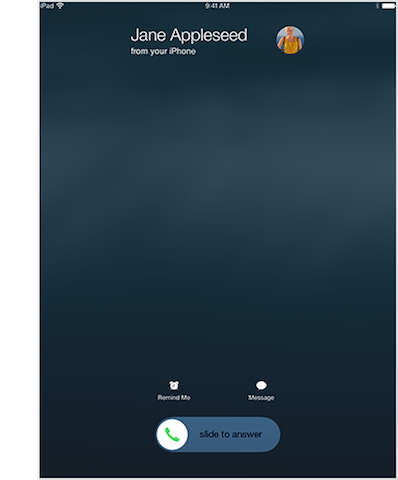
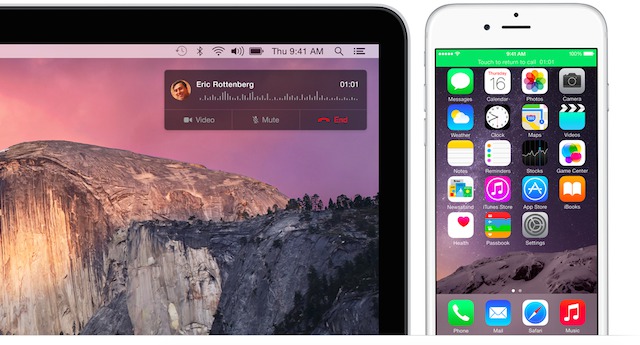
Now go to your iPad or Mac contacts and click on the phone icon next to the contact. You can also answer calls, which is done in a simple way. On an iPad, simply swipe to the right and on a Mac in the upper right corner, click to accept, just as if someone were calling you via FaceTime. If you meet all the requirements, you should be able to send SMS messages from your Mac and iPad. To do this, simply open the Messages app and your conversations should be synced.
Instant Hotspot
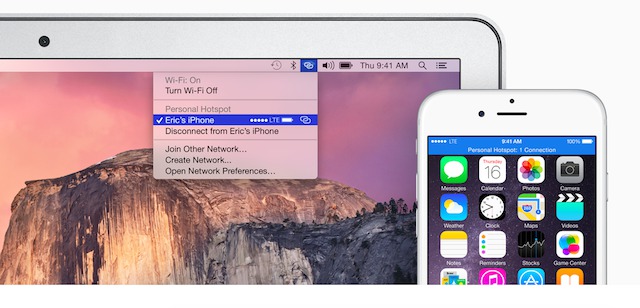
There's also a new way to quickly and easily use cellular data on your Mac. Your Mac will recognize that it doesn't have an internet connection, so your Wi-Fi menu will automatically show your iPhone. This sounds like a great feature, but be warned! We all know how it is with carrier data. Data is expensive and there's usually not much of it. So think about what you're doing on your Mac and how much data you're downloading.










all the time it was decided that NB must have BT4.0. ... nothing about that from s iOS8 I won't be supported by all devices… I have a 4S and I'm sad :(
I have the last non retina macbook a iphone 5 ios 8.02. I am not able to walk. handoff nor continuity. AirDrop only works for me from Mac to mobile, not vice versa. Does anyone know what to do with it? Thanks
Guys, I have a problem. When I had a developer preview Yosemite, texting and calling from my Mac has been working fine since beta 2, I think… I installed the final version last night and when I wanted to send a message from my Mac, it wouldn't load my iPhone messages and when I entered the number and wanted to send a message, it gave me the error "Address XYZ is not in service" iMessage registered" and as soon as I typed in the number, it found it from the address book and next to it iMessage :( I would like to point out that I have new HW (only iPhone 4s, but the supported one should be and it worked for me in Dev tooPreview.), I am logged into the same account on iCloud on both devices. I just tried a clean install of Yosemite from a USB stick and the result is the same – it always gives me the number as iMessage. Anyone have any advice please? :(
So for those who have the same problem – it looks like it will only work with iOS 8.1… :/
Have you stopped sending sms messages from your mac? I can make calls from my mac, but I can't even send SMS...
Excited as a little boy, I installed Yosemite...and was looking forward to playing with it. handoff a continuity (assuming 4S and Macbook mid 2011 fine)…and nothing…support told me that I can maximalne pick up the call..see: http://support.apple.com/kb/HT6337?viewlocale=en_US&locale=en_US
Enjoy the day
I have ip4s .. :)
And isn't there a condition that you have to have the same network over Apple device (Time capsule, Airport extreme etc.) ?
When we were on Wifi at my place where I have the whole network from Appso so handoff It works without any problems, but when I was at a friend's house with TP-Link, the call didn't transfer from the iPhone to the iPad...
sikulito: Well, that's a lot of sadness.. I hope that at least those sms will run on 4ske..
sokoliar: Tell me...I installed it at 3 am..:) They don't even send SMS...I don't even have the on/off option in the settings Handoff..
I mean sms on 4ske but on Monday, on ios 8.1.. I didn't read anywhere whether it will run or not..
Yes, like that...:) I haven't solved it any further....so I'll probably be surprised(?) on Monday...:)
Very bad article. What about informing readers for which devices which feature is available? E.g. MacBook Air 2011 only has calls through iPhone, for other functions it needs to be bypassed.
Proč not to mention that some features such as SMS and Instant Hotspot are not available in iOS 8.0.2 and do we need to wait for 8.1?
ProSo, local writers shouldn't just stupidly copy from foreign servers, but should find information about what they write. I'd rather not talk about testing :(
If I read correctly, calls should be possible on the IP 4S via mac etc., but I'm not sure. I called support and they told me no, but according to this article it should work, by the way it also explains why they don't send SMS and that it will only work with ios 8.1 http://support.apple.com/kb/HT6337
I don't have a 4S yet. ios 8, just calling would make me do it, can anyone try this?
Otherwise, if you switch the article to the Czech language, the mention of 4S will disappear, therefore on apple line doesn't know about anything... So I don't know where the truth is, it would take someone with 4S to try it.
Can I ask how to set spotlight in yosemite so that it also searches the net? It only searches for files on my Mac. I have all search options checked in the settings. Any advice?
Aaaah:/ iPhone4S
hello, does anyone have experience running Yosemite on MBP Early 2011?
Can someone please advise me? I'm getting the latest mb for 13 without retina with yosemite and ip5s with the latest ios8. In Mac in finderI have it turned on. handoff and my mac is on wifi, I turn on bt on my iphone and even if I do something on my computer, it doesn't show up on my ip and vice versa. Handoff it doesn't work for me. I don't know how to solve it... I have the same account atcloud on both the ip and mac. Do the devices have to be paired? Proplease advise..thanks
I'm afraid that the search, as it was presented, will not work for us. We don't have siri and so neither does searching.
@appleThomas:
On Mac, Settings > General > Turn On Handoff
On iPhone Settings > General > Turn On Handoff
Both devices on the same wifi and turn on bluetooth (just to be sure, I don't know what is enough).
Then it should be enough to open in Safari some page (nestonly Safari) and it must appear.
Otherwise, check if you are underCloudem on the same account (i.e. you are not logged in under your primary email on one and under your secondary email on the other).
If it doesn't work, it's a good idea to restart the device or turn it off and on.Cloud (golden old apple, where everything worked without problems)
@Harry:
Calling from a Mac and iphone 4s works without problems, call quality excellent, mac rings as soon as it rings iphone.
What I regret is that there will be no support for continuity, I'll see on Monday if I can send sms from a mac..
@Harry, as the falconer says, I can also confirm that it's going well :)
@sokoliar continuity It doesn't bother me so much that it won't go, I really do a lot of times nesthello, if I need to write an email from my mobile phone to a mac, I know that I will write it, I'll start straight away on the mac :D... I'm rather angry that they didn't make calls and sms via bluetooth, because we have internet via cable on the intranet (I can't use wifi), so I'll probably only use it at home :/
Doughnut, thank you for the guide, I tried all this and nothing... I thought that you must have access to the lower sheets of the notification center turned on or something like that and it still doesn't work....
@marcus, I have early 2011 Yosemite on my MBP, and everything runs perfectly fine, just Jitouch doesn't work on 100%. But it's true that I have an SSD, I don't know how it works on a classic HDD.
@ Sokoliar and Contra, thanks a lot for the info guys. Continuity It doesn't bother me much either, I would be fine with making phone calls via Mac and texting.
@Sokoliar, when you know if he sends SMS tomorrow, maybe write it here, I would be grateful for the info.
@Appletomas, the fact that it doesn't work for you may be because the upgrade to Yosemite didn't go as it should, or as they say on apple he didn't catch the support as he should :)
For example, the share button didn't work anywhere for me, which is, for example, in safari to the right of the line where you enter the address, it's everywhere else, it just didn't work. Or my friend's desktop icons kept disappearing and appearing after the upgrade. After trying to reinstall the system while preserving data and settings, which didn't work, I had to format and do a clean install. Now everything works as it should. So it's quite possible that trying everything won't help you either...
iPhone 6+ Macbook Pro late 2013 retina (yosemite) and continuity It's not working for me, but I can receive calls. :(