
If you are just deciding whether to buy Apple TV and since a young age there was something inside you that always told you that the Playstation wasn't all that bad, maybe today's article will convince you to pay around 4000 CZK extra and buy a PS3 instead Apple TV. The PS3 game console itself, in addition to playing games, can also play Blu-ray discs, where its mechanism is currently one of the best that can be purchased among Blu-ray players under 10 CZK. In addition, the PS000 can of course display videos and photos, either from a hard drive or directly from your Mac computer, using a wireless Wi-Fi connection. Using the PS3 Media Server application, you can create a perfect home media center from the PS3 and Mac.
PS3 Media Server
The freely available application is written as Open Source, so skilled users can customize it to their liking and use already written codes. The application is currently in version 1.50.0, which is also the subject of this article. Pro To use PS3 Media Server, you must first enable PS3 access to the local Wi-Fi network to which the computer with the content you want to play on PS3 is connected. So just connect PS3 to the Wi-Fi network that also contains the computer with the desired content and then enable PS3 Media Server. You can find everything in the PS3 settings and change it in a few seconds. Enabling Media Server is important, because without it, PS3 will not connect to the computer.
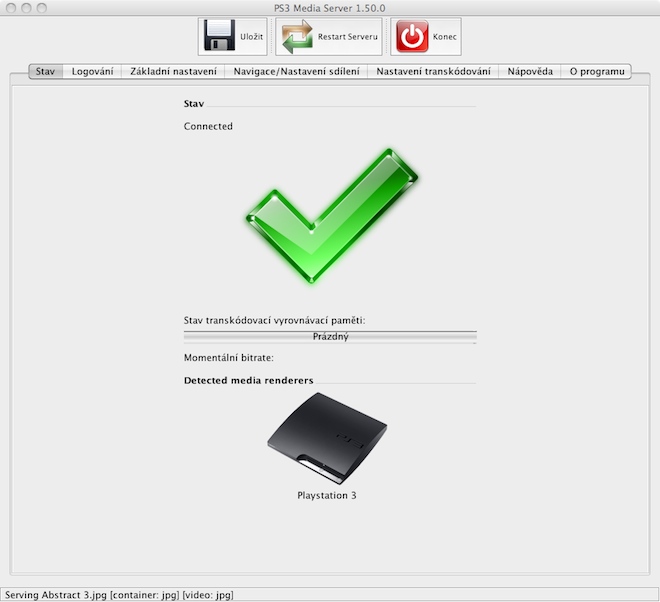
If you have everything enabled on your PS3, now all you need to do is download the PS3 Media Server application, which is available for free here . The application detects the PS3 immediately after launch, which must be turned on at the time of detection, connected to the local Wi-Fi network and have Media Server enabled, i.e. everything I wrote about above. If everything is fine, the application detects the PS3. The application is completely in Czech, which you will certainly use especially when setting up more complex encoding and other things that you do not have to use at all, it depends solely on you.
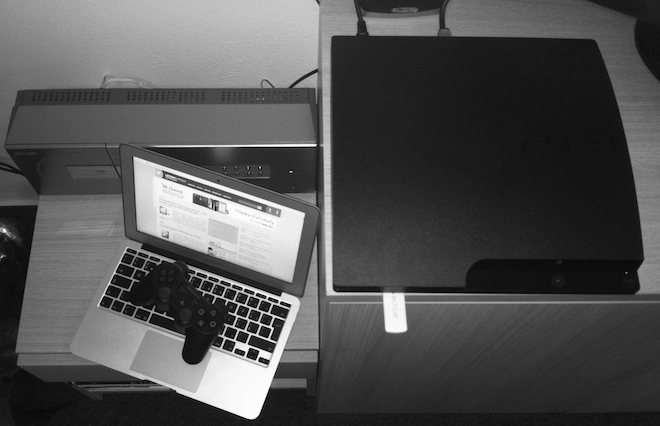
*MacBook Air 11″ 2011, PS3, Active 2 sensor and Sharp 1BIT amplifier communicate beautifully
Basic settings
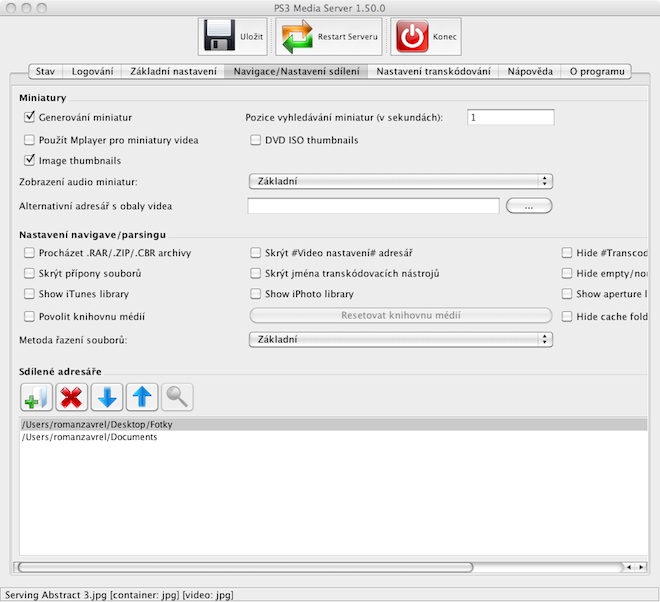
Unless you consider yourself an expert in setting up Media Servers, you'll probably be fine with being able to view your files on the PS3 and therefore play them on the TV. All you have to do is go to the Navigation/Sharing Settings tab in the PS3 Media Server application and select the folders you want to browse on the PS3 under the shared directories item. If you don't select any folders, you have the option to browse the entire computer drive, but I don't recommend that. All you have to do is select the folders that contain the videos, photos and music that you want to view or play on the PS3. Of course, you can also set the sharing of iPhoto libraries, iTunes libraries and other things in this tab that will make your work easier. Thanks to the fact that the application is completely in the Czech language, it is not worth describing in detail what each setting does.
Gallery
If you are just deciding whether to buy Apple TV and since a young age there was something inside you that always told you that the Playstation wasn't all that bad, maybe today's article will convince you to pay around 4000 CZK extra and buy a PS3 instead Apple TV. The PS3 game console itself, in addition to playing games, can also play Blu-ray discs, where its mechanism is currently one of the best that can be purchased among Blu-ray players under 10 CZK. In addition, the PS000 can of course display videos and photos, either from a hard drive or directly from your Mac computer, using a wireless Wi-Fi connection. Using the PS3 Media Server application, you can create a perfect home media center from the PS3 and Mac.
PS3 Media Server
The freely available application is written as Open Source, so skilled users can customize it to their liking and use already written codes. The application is currently in version 1.50.0, which is also the subject of this article. Pro To use PS3 Media Server, you must first enable PS3 access to the local Wi-Fi network to which the computer with the content you want to play on PS3 is connected. So just connect PS3 to the Wi-Fi network that also contains the computer with the desired content and then enable PS3 Media Server. You can find everything in the PS3 settings and change it in a few seconds. Enabling Media Server is important, because without it, PS3 will not connect to the computer.
If you have everything enabled on your PS3, now all you need to do is download the PS3 Media Server application, which is available for free here . The application detects the PS3 immediately after launch, which must be turned on at the time of detection, connected to the local Wi-Fi network and have Media Server enabled, i.e. everything I wrote about above. If everything is fine, the application detects the PS3. The application is completely in Czech, which you will certainly use especially when setting up more complex encoding and other things that you do not have to use at all, it depends solely on you.
*MacBook Air 11″ 2011, PS3, Active 2 sensor and Sharp 1BIT amplifier communicate beautifully
Basic settings
Unless you consider yourself an expert in setting up Media Servers, you'll probably be fine with being able to view your files on the PS3 and therefore play them on the TV. All you have to do is go to the Navigation/Sharing Settings tab in the PS3 Media Server application and select the folders you want to browse on the PS3 under the shared directories item. If you don't select any folders, you have the option to browse the entire computer drive, but I don't recommend that. All you have to do is select the folders that contain the videos, photos and music that you want to view or play on the PS3. Of course, you can also set the sharing of iPhoto libraries, iTunes libraries and other things in this tab that will make your work easier. Thanks to the fact that the application is completely in the Czech language, it is not worth describing in detail what each setting does.
Minor disadvantages include the fact that shared folders on the PS3 are loaded in each item. For example, if you select on the PS3 Audio, all folders will be loaded, including those that only contain photos. If you select the PS3 photo gallery, folders that do not contain any photos will also be loaded. However, this is not the fault of the PS3 Media Server, but of the PS3 itself, which does not distinguish between folders, but only the files themselves. So if you open a folder containing photos in the music player on the PS3, the photos will of course not be loaded and you will not see them. If you play around with the PS3 Media Server settings, you will soon find that it has almost unlimited possibilities. In fact, completely unlimited possibilities, thanks to the fact that it is open source and its code is fully available to you. If you have a PS3, you really do not need to invest in Apple TV.
- You can download the PS3 Media Server application for free here.




absolutely great!!!! thanks a lot, i was thinking about Apple TV and I was looking for some info on connecting PS3 and Mac, but in vain, until today
I don't like the title of the article at all! I have nothing against the fact that for some people the PS3 is a great home device that can handle much more than an ATV, but... For me, the PS3 is something completely unnecessary, I play games on a PC, Blu-ray doesn't appeal to me at all. KoneI just got rid of the DVD and I'm going to exchange it for another disc, which I have to take out and put in another one when changing the movie? Pro I think the future is streaming anything from home storage (like NAS) directly to the TV. TVs can't handle it yet, and for people like me, a great solution is ATV or another box that acts as a media center. I currently have an HTPC assembled, but one thing annoys me - the device's power consumption. The HTPC (with the AMD Brazos platform) consumes about 50W. And it can do almost the same as ATV, which uses about 5W if I'm not mistaken. Of course, ATV has its flaws (resolution, higher bitrates, etc.), but it has other fundamental advantages. So I would definitely prefer some kind of multi-media center - in this case ATV.
Great article. Thanks for the tip!
That's right AppleTV with appliances maxat least 6W and any network storage we will have:
PS3 – 100W/200W (depending on the version) + PC – 100-300W. It's not even funny anymore.
I don't even bother starting the stream from the laptop, it can be connected directly to the TV and when I take it away, nobody will lose anything.
Nice, but...onethat's it completely AppleIt won't replace the TV, so I'll go for it anyway:) I'm just hesitating whether to wait for the new generation, but at that price it's probably not worth the trouble :)
I would slightly change the sensational title of the article and throw it out "...forget about Apple TV"
How does the PS3 handle it? AirPlay from iOS, iTunes Match, PhotoStream?
And here AirI will replace the Play feature on ps3 whose?
R: funny, but embarrassing answer :-)
Do Apple TV I'm only going to do it so I can mirror from the 4S, that's why I bought it :-)
@Roman
AirPlay allows you to play video (YouTube,...) and view photos, listen to music,... directly from iPhone/iPad wirelessly via ATV2 to TV.
how do you solve it for me with a 320 GB disk connected to PS3?
I'm glad that more people have the same opinion as me. In my opinion, ps3 and atv are not really the same solution.
PS3 is a completely different product for a different end user and with a different philosophy and way of thinking AppleTV.
into my world (Apple ID account where I have purchased a lot of music and movies, iTunesMatch, andCloud with PhotoStream, iMac, iPhone, iPad) Apple TV it brings another level of comfort where all these devices and services are connected to the TV.
The PS3 can thus precisely stream movies from the media server on the PC, which in this case is the MBA.
I take it as information, but not in the context of "don't buy and throw away all the ATV2 because there's a PS3" !!!
Apple TV is a product that is very cheap and very accessible... the only place where it is Apple TV it's a headline, so I'm very sorry for that onen headline (For the second time.
thank you for the article, the title doesn't matter, the content is more important :)
I've tried to start a PS3 server before. MacBookbut unfortunately :( PS3 was quite unruly. My opinion on PS3 – great console for playing games… unfortunately the rest is quite weak (movie playback, working with music libraries, etc.) apps) I think that SONY with a machine like the PS3 (performance) could have delivered better software...
I have one question: What about subtitles for movies??
I think this article is really useful, but for those who already have a PS3 at home.. If what the PS3 Media Server offers is enough for them, they don't need to buy Apple TV.. It was enough to write it at the beginning of the article, and there would have been no need for any debates about this article being a ****.. :(
@Roman: Apple Tv How much do the cables cost to connect? What do you have? I assume that the distance between the devices is not even half a meter. I would say that even HDMI cables in the order of hundreds are enough for this distance. It is clear to me that marketing is doing its thing and just to feel better, it is better to buy the most expensive one. :)
Well, especially the cables for the amplifier, HDMI, I have the one that has the best price-performance ratio for a liter, but I definitely don't want to discuss what I have and what I don't have. Unfortunately, the article was not intended to make people buy a PS3 if they never heard of it. nestali. More like a way to use PS3, I think that people who don't want PS3 like you, for example, don't have the slightest reason to clean it. That's like if I wrote that if you have a Bentley, you can buy tires like this and that and upload this and that software to it and connect it via BT with iPhoneYou probably shouldn't buy a Bentley either because it can be connected to iPhone.....
After all, it has one advantage, if you play a 2,5-hour documentary with a size of about 12GiB, in .mkv format, you have something to watch for about 5 hours, in short nestiha and yes it will play the subtitles.
Otherwise, I thank the author/rom for great articles, there is always something new to discover, although it is not always useful for me, but that's the point, maybe this trick helped someone else fulfill their expectations.
Personally, I will go from HD to Mac to TV and sleep and connect with every cable until someone comes up with a better solution.
I use PS3 for media playback – except for photos. I find it perfectly sufficient for music and film playback. It is also good to remember that there is a DVB-t tuner for PS3 and that makes PS3 an excellent recorder – I have slowly replaced my DVD HDD recorder with this. However, as for streaming. I have used this function about 2 times. Then I bought an HDMI cable and prefer MacBookI play movies or anything I don't want to copy to the PS3 directly via HDMI cable. It's easier and in the case of HD movies, faster and smoother without losing quality.
This is a great solution and I use it myself, but for future PS3 Media Server users I would recommend connecting your PS3 to a LAN cable. If you don't have a mega Wi-Fi router, HD video won't do you any good. I have a PS3 and a MAC on a LAN cable and I play 1080p movies just fine. Of course, it also depends on the processor in the MAC.
Amazing!!!! LsA is the best :) Thank you very much for the work you do :)
Hello, please don't you know why I can't add folders on the external drive to the Shared directories? I can't find him there at all. Thank you very much for any help, if at all possible.
I would also add that it can also be shared from iPhone on PS3 via app iMediashare. Otherwise, as Streeter writes, the PS3 requires a network cable. My wifi often crashed.
Does the PS3 support WiFi 802.11n? or just 802.11g?
this can be a stumbling block as to why it doesn't work as it should for you via wifi.
802.11n is a matter of course for everyone Apple products since 2007
I took some time and googled that the PS3 supports WiFi standard 802.11 b/g, which is useless for video streaming. So the video only network cable :(
I used it like this for about a year and finally linked Mac Mini via HDMI directly to the TV and installed XBMC. I don't know how in the last versions, but in the first ones, PMS had terrible problems with mkv and HD movies in general, especially when you wanted to use rewind/forward. Although in the 2 years that I haven't had it, it may have changed :)
No thanks. XBMC allows me to do all this and much more :) and it also runs on ATV which is much cheaper, smaller and less fussy. (personally, I don't understand consoles at all, but that's just my opinion) And if you just want a multimedia center, it's not better than a Raspberry Pi. It costs a thousand and can do everything you need.
As already said, the title is ok, it doesn't matter at all. What is important is the content of this article, and it is great. I have ps3 and atv2, but then I didn't try the option with ps3, as soon as I get home I'll get into it ;-)