Close ad

Mac OS X computers are no longer the prerogative of graphics and design professionals. By dispelling the myths about the unusability of software and the high cost of hardware, they are becoming more and more accessible to the masses. Mac mini or Macbook almost everyone can afford white.
It's no wonder that students are the class in which computers Apple they use more and more. Young people like to discover new and interesting things. Today's modern student suffers not only from the quality of his school or university library, but also from his technical equipment. Various seminar, course, bachelor's, diploma theses, but also ordinary preparations for teaching and various papers cannot be done without the use of computing technology (mainly laptops due to their portability).
Most students use for versatility Windows, the percentage of Mac OS X (or Linux) users is minibarely. For those who use a Mac (or would like to), I have prepared a list of useful applications that, although they won't write assignments for you, will at least make your student moments a little more pleasant and easier.
cram-iconMac OS X computers are no longer the prerogative of graphics and design professionals. By dispelling the myths about the unusability of software and the high cost of hardware, they are becoming more and more accessible to the masses. Mac mini or Macbook almost everyone can afford white. It's no wonder that students are the class in which computers Apple they use more and more. Young people like to discover new and interesting things. Today's modern student suffers not only from the quality of his school or university library, but also from his technical equipment. Various seminar, course, bachelor's, diploma theses, but also ordinary preparations for teaching and various papers cannot be done without the use of computing technology (mainly laptops due to their portability).

Most students use for versatility Windows, the percentage of Mac OS X (or Linux) users is minibarely. For those who use a Mac (or would like to), I have prepared a list of useful applications that, although they won't write assignments for you, will at least make your student moments a little more pleasant and easier.
1. Schoolhouse
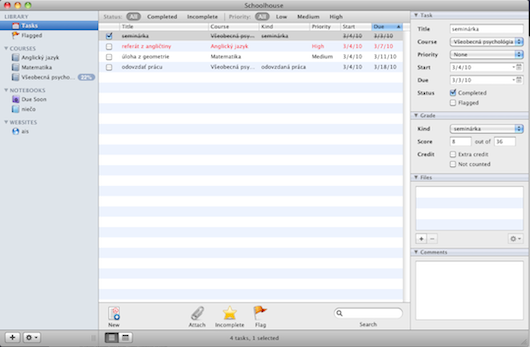
Schoolhouse is basically also a simplified student GTD. At the beginning of the school year or semester, you anxiously add the expected subjects and then look forward to seeing how your passing percentages progress. Of course, only if you use a grading scale based on sub-tasks. This type is used in some subjects at universities, e.g. a certain percentage of success is a test, some presentation of the work and its written submission. Depending on what you have already done, you can gradually "tick" it off.
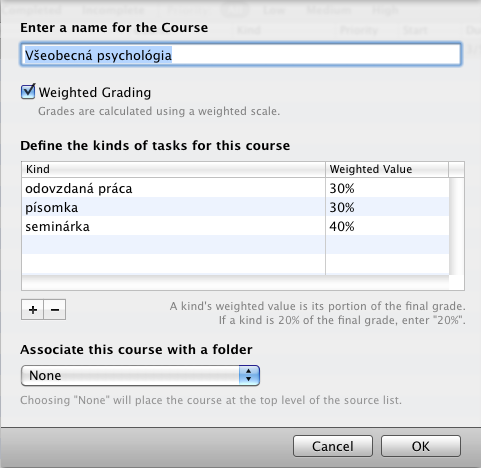
The basic "mac-os like" window of the program offers an overview of everything needed - a list of current tasks and details for each marked task ("seminar" in the picture)

schoolhouse2

To insert a new subject:
schoolhouse1
If you want to have an overview of what awaits you in the next few days and what doesn'tminie, just switch to the built-in calendar:
For each task, in addition to the basic information, it is possible to insert a comment or links to files, or to mark the task as completed. I will mention the possibility of creating smart folders (here it is called "notebook"), where you can automatically filter, for example, all documents. A very good gadget is the "websites" section, which serves as a simple built-in browser. If you use some pages specifically for student purposes (eg a class page), you can keep them together there.
For a student price, this program really offers everything you could need to organize your school life.
http://www.schoolhouseapp.com/
License: Trial
Price: $14
2. Circus Ponies
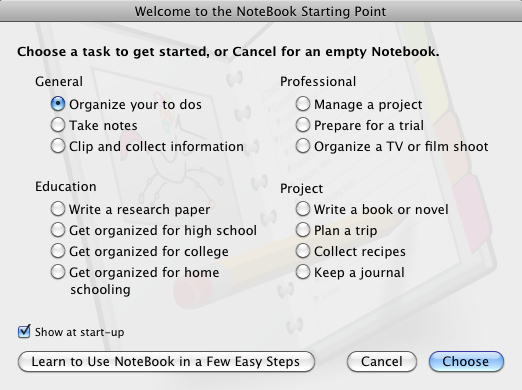
Now that we have an organization app, we need another one that will serve mainly work purposes. This is the Circus Ponies Notebook. It is a program for creating notepads for various purposes. What purposes you use it for is up to you, you can be inspired by the opening window of the program, where there are, for example, such possibilities: organizing notes, collecting information, managing a project, planning a trip or writing a book.
circus ponies1Notebook has a template for every purpose. Another is for writing a book, another for planning a trip, for example.

The appearance and actually anything can be set at will. Of course, various files, url addresses, images, etc. can be attached. Synchronization of tasks with iCal is a plus.
I see the necessity of registration when using the trial version as a slight disadvantage. If you decide to buy a Notebook, you will certainly not write term papers or a diploma in it, but it will certainly serve to organize the mess at school :).
License: Trial
Price: $29,95 student license
3.Things
When enumerating useful applications, we cannot bypass the king of GTD applications for the Mac platform, which is Things. If you don't know what GTD is, I recommend MrLecturer Petr Mára from Barcamp. It is a bit complex for normal organization of things, but within the mentioned method it is the best tool. So if you are drowning in responsibilities and don't know what to do first, I recommend studying GTD first. Otherwise, you can get by quite well with the aforementioned Schoolhouse.
The essence of working with Things is the division of responsibilities into projects and tasks. We need more steps to complete the project. ProFor example, the project may be to write this article, the task within it is to "collect a list of available student programs" or "make an outline".
When we sort out all the responsibilities in this way, we can assign different tags to them, set a date by which they must be fulfilled or associate them with different people. According to what "burns" the most, current tasks that need to be solved pop up in the "Today" item. The pro application is also a plus iPhone, with which everything can be synchronized.
License: Trial
Price: $49.95
4. Anxiety
For those who use iCal, this little utility will come in handy. It will settle in your menubar and wait until you need it. It can basically only do one thing, but simply and effectively. At first launch you will see a window like this:
Above, you switch between iCal calendars and Anxiety shows you the individual to-dos you have marked in them. You can create a new note by clicking on the pipe.
Anxiety is for the forgetful, who can keep it always displayed on the desktop to remind them what needs to be done. Dressed in a great design, it can become your everyday helper.
http://www.anxietyapp.com/
License: Freeware
5. Skim
Skim is an advanced PDF viewer that has replaced the built-in one for many Preview. In contrast, it offers adding and editing notes, highlighting important text, full-screen mode, bookmarks and many other options, such as support Apple Remote or LaTeX.
Skim is an indispensable helper when collecting study material, writing final theses and the like. In addition to the mentioned advantages, it should be mentioned that it is completely free.
License: Freeware
+1 edukit.sk
The last application we will introduce today is the web application edukit.
The advantage is that it is basically not tied to anything and you can access it from any computer with an Internet connection. It is especially suitable for primary and secondary school students, where the hour-by-hour learning system prevails.
First, you need to add subjects to your timetable. For each, we can set how much we have to learn. That is, if we know that math will always take us at least half an hour, we set it to 30 min. There is no need to study for the physical exam, we will leave 0 there.
If we have a specific task for a certain day, we put it in Home tasks.
Grades from subjects have a separate item in the menu: If we organize ourselves in this way, every day Educat will show us how much we have to learn for which subject.
The author of the application is Slovakian Vojtech Riník and registration is completely free.
Not everyone likes the student sandwich, but you have to make it as pleasant as possible. It is also possible with the help of these applications. I will help you to keep your responsibilities in order, so that you can handle them as soon as possible and as best as possible, so that you can devote yourself to fun, family and your friends.
Monika Zbínová
"monica"

Today's most read

.