
iPhone is a powerful tool, and so is its camera. It's really high quality and you can already take quality photos with it, right? Apple also proves it in the advertising campaign Shot on iPhone 6. But let's face it, even older models don't have a bad camera, and for example the photo I took with the help of your old iPhone 4, attracted attention. Of course, time has moved on during that time and I currently have a newer model in my hands, with which you can also take interesting photos. And a particularly interesting moment will occur when nature stops raping us with 40-degree heat and treats us to a change in the form of storms.
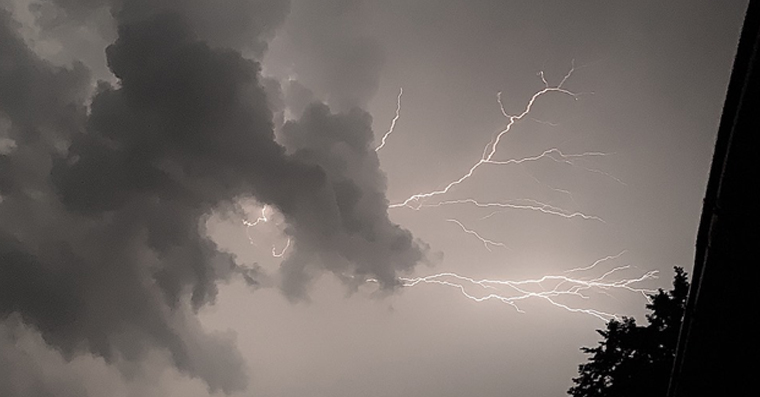
This of course brings many opportunities, especially at night. In addition to being a person konehe can sleep well without waking up sweaty in the morning, because he has the opportunity to watch the natural spectacle, from which respect comes. Respect for something as powerful as lightning. And they can fascinate people so much that they would like to take a picture of them and share a truly unique photo with their friends - if only because no lightning looks the same and they last so short that it is quite difficult to photograph them. I am one of those who enjoy this kind of activity and even on Sunday I managed to take a photo that is getting likes on Facebooku.
Do you also want to take photos of lightning? If yes, then you will definitely appreciate this article. Actually, I'm going to share with you my technique of shooting lightning with the help of an iPhone. So sit back, keep reading and occasionally look out at the clouds.
So, first of all, I have to warn you that in order to create a high-quality photo, you need to find a place from which the flash can be photographed. You can take pictures either with the iPhone pressed against the window or there is also the possibility of standing on the balcony or in front of the house - of course if the storm is far enough away, you still don't want to be struck by lightning just because you are reaching into the air with electronics in hand. In connection with the team, I would also like to remind you that even though it is recommended during a storm that a person nestál on the spot, it is more or less necessary when taking pictures. No one knows when lightning will strike, and once you've found a suitable spot, you have to keep a cool head, you have to concentrate only on taking pictures and, above all, you have to be in a static position, almost like a sniper. And I'll stress it again, focus on your goal. That's why I usually turn off WiFi and mobile data, I don't want to be disturbed by callsonenia Messengerand other services.

And at the same time I get to the iPhone itself. For the best effect, in this case it is better to use the classic Camera application instead of VSCO or others. First of all, so that the photos are not blurry but are as sharp as possible, turn off AF/AE. How to do it? Almost like when you want to focus on a certain subject, you just hold your finger where you want to focus. Also hold it there for 2-3 seconds and then a yellow square with the text AF/AE Off will appear on the screen. As long as you use iOS 8, then you will definitely notice the sun with which you decrease or increase the brightness of the photo. Since you don't want the photo to be overexposed due to the flash, lower the brightness level by starting to move the sun down. You don't need much, but at the same time you want as little ambient light as possible to be visible on the display. By the way, focus on a spot, like a lamp - by focusing on it, you'll be sure that the photo will be sharp and not a blurry blemish that you can erase.
And one more thing - have enough free space on your phone. Unless you're a wizard, you don't know when your "lucky" lightning will strike, so you have to take pictures carefully. On older models, you have to press the shutter button regularly, on newer models you can use Burst Photo, i.e. hold the button to take pictures. Expect that after taking photos, you will have around 600 photos on your phone, of which only one is worth it. You can of course delete the rest, but as I say, when taking a flash photo you have to have your finger as close as possible to the trigger and since it is not certain when this will happen, I solve it by simply taking a single photo and then after the flash, which was good enough, I simply go to the gallery and tidy it up. The resulting photo can be edited if desired.
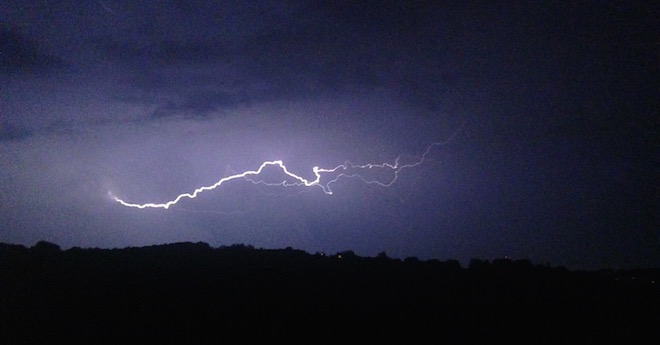
Bad photo:






I take pictures of flashes with my iPhone simply.. I turn on video recording, wait for the flash. Then I find the flash in the video and fix it screenshot, it's pretty sharp and bright.. :)
I also tried burst photography with a flash, and when the flashes are fired one after the other, you can take quite nice photos for the fact that it's a phone.
Refox: I wanted to write exactly the same thing... and I'll calmly put my hand in the fire for that because he did it that way too, because if he tried to do it classically with a camera, he wouldn't be able to do it when the lightning only occurs for a second...
When you open and download the photo, you will find that it has a resolution of 3264×2448, so it is a photo, not a screenshot.
When you shoot a video and take a screen shot, the photo will have a resolution of only 1136×640 for iPh 5/5S or 1334×750 for iPhone 6.
I use the SlowShutter app. You can set the shooting time and light intensity. Then just turn on the photo and wait for the flash. The resulting photo is noise-free and always worth it. Here's a sample:
http://picload.org/image/iwlaico/img_5500.jpg
I'd rather make a video too
I gave those bursts this one https://scontent-ams2-1.xx.fbcdn.net/hphotos-xpa1/t31.0-8/1065129_10202083774911084_2122233546_o.jpg
ProIt was already done via FB, so the size was reduced, etc.. but I think it's better than the video.